TalkWithLead
AI Voice-First Lead Conversion

AI Voice Agents That Turn Website Visitors Into Real Conversations

TalkWithLead is the AI voice-first widget that turns a website visitor into a phone call. The visitor enters their number, the system rings them, and an AI voice agent talks with them — multilingual, extremely human-sounding, and free to call between a list of supported countries. More calls. More leads. More closed deals.

Extremely human-sounding voice 23 published languages out of the box Unlimited minutes on every plan Instant callback widget

Tag: lead capture

  • AI Voice Agent vs Callback Widget vs Live Chat: What Converts?

    AI Voice Agent vs Callback Widget vs Live Chat: What Converts?

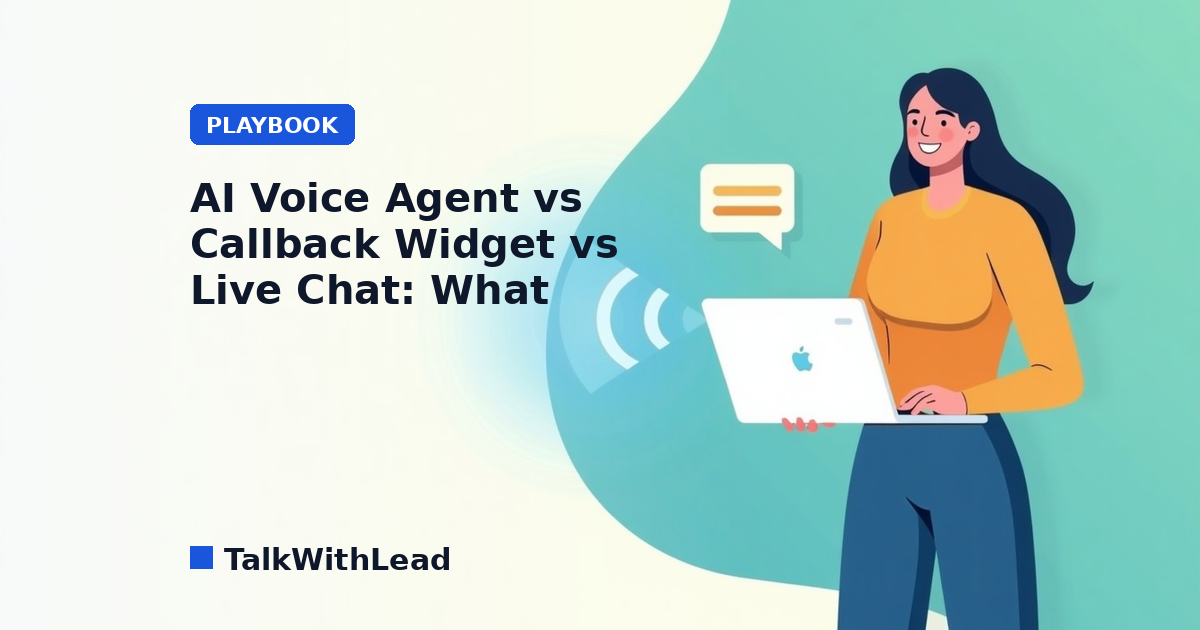
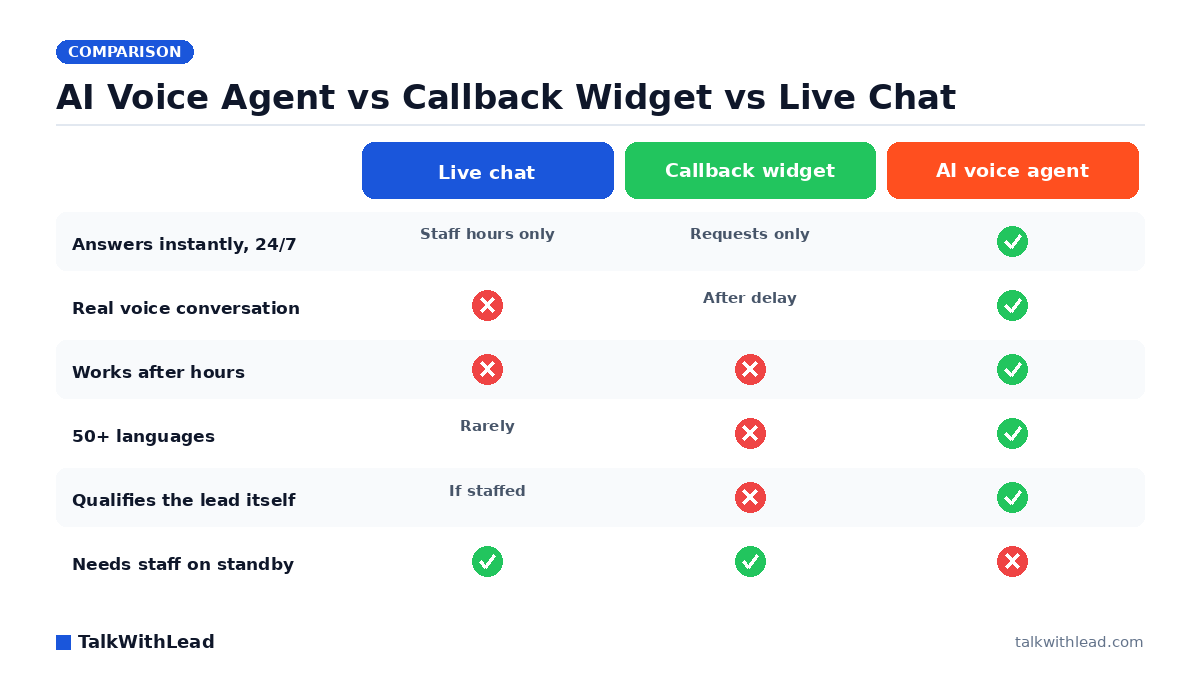
    AI Voice Agent vs Callback Widget vs Live Chat — TalkWithLead original infographic (comparison diagram).
    AI Voice Agent vs Callback Widget vs Live Chat

    The Real Question Behind This Comparison

    Every one of these widgets makes the same promise: turn an anonymous website visitor into a lead before they hit the back button. But the ai voice agent vs callback widget vs live chat decision is really a decision about who answers, and how fast. Pick wrong, and your best prospects click away to a competitor who picked right.

    TL;DR: Live chat converts only when a trained human is actually online. A callback widget captures phone numbers but inserts a delay between intent and conversation. An AI voice agent removes both weaknesses — it calls back every visitor instantly with a human-sounding voice, in more than 20 languages, at any hour — so for most businesses it converts more visitors into real sales conversations than either alternative.

    How Each Option Actually Works

    Live chat puts a text box in the corner of your site. When a visitor types, someone on your team is supposed to reply within seconds. In practice, chat sits unmanned during lunch, after 5 p.m., on weekends, and whenever the person covering it is on the phone. The visitor types a question, watches the cursor blink, and leaves. Even when it works, you get a typed exchange — not the phone call where deals actually close. We broke down that gap in Live Chat vs Chatbot: Pros, Cons, and the AI Voice Upgrade.

    A callback widget flips the interaction: the visitor enters their number, and your team calls them back. It respects a truth live chat ignores — serious buyers want to talk. But it still depends on a human dialing back quickly. If the callback lands in 30 seconds, it converts well. If it lands in an hour, the lead has often gone cold or gone shopping.

    An AI voice agent collapses the whole sequence. The visitor clicks, and an extremely human-sounding AI voice answers immediately — no number form, no queue, no waiting for a rep. It handles the conversation naturally, answers questions, qualifies the lead, books the demo or appointment, and offers an instant callback to the visitor’s phone if they prefer. Because it speaks more than 20 languages and supports free long-distance calling between supported countries, a prospect in Madrid or Mumbai gets the same instant conversation as one down the street. You can hear it live in a two-minute demo — the fastest way to understand why voice beats a text box.

    Which Converts More Website Visitors: AI Voice Agent, Callback Widget, or Live Chat?

    Conversion in this category comes down to three variables: response speed, conversation quality, and coverage. Here is how the three options compare on the dimensions that decide whether a visitor becomes a booked call:

    DimensionLive chatCallback widgetAI voice agent
    Response speedSeconds — if staffedMinutes to hoursInstant, always
    After-hours coverageNone (or a bot)Captures number onlyFull conversations 24/7
    Conversation mediumTextVoice, delayedVoice, immediate
    LanguagesWhatever your team speaksWhatever your team speaksmore than 20 languages
    Lead qualificationManual, if staffedManual, after callbackAutomatic, in the call
    Staffing requiredConstantOn-callNone
    Long-distance prospectsText onlyToll costs applyFree long-distance calling between supported countries included

    Why does speed dominate this table? Because the research on lead response is brutal. The MIT Lead Response Management study found you’re about 21× more likely to qualify a lead contacted within 5 minutes than one contacted at 30 minutes. Live chat can hit that window only during staffed hours. A callback widget hits it only when someone drops everything to dial. An AI voice agent hits it every single time, because “response time” is the time it takes the visitor to click. We go deeper on the speed math in Speed-to-Lead: Why the First 60 Seconds Win Most Deals.

    And the answer-rate problem is worse than most owners think. According to a 411 Locals study of 85 small businesses across 58 industries, only 37.8% of incoming calls were answered by a live person — meaning roughly 6 out of 10 calls went unattended. A callback widget that routes into that same overloaded team inherits that same failure rate.

    The ROI Math: What a Delay Actually Costs

    Here is an illustrative example — your numbers will differ, so plug in your own. Say your site gets 2,000 visitors a month, and imagine just 2% would talk to someone if a real conversation were one click away. That’s 40 potential conversations. Now assume a widget that depends on human availability catches only the ones arriving during staffed weekday hours — say half — and that delayed callbacks lose a further share to cooled-off interest. You could easily be having 15 conversations instead of 40. If even a modest fraction of those conversations become customers worth $1,000 each, the gap between the two setups is tens of thousands of dollars a year — from the same traffic you already paid to acquire.

    Don’t take the hypothetical on faith: run your own visitor count, close rate, and deal size through the free missed-call revenue calculator. It uses your inputs and labeled assumptions, and it takes about a minute.

    When Each Option Is the Right Choice

    Choose live chat if you have trained staff genuinely available during all your traffic hours and your buyers prefer typing — some support-heavy audiences do. Just be honest about coverage: an unmanned chat box converts worse than no widget at all, because it advertises a promise you’re breaking in real time.

    Choose a plain callback widget if your team reliably returns calls within a few minutes and your traffic is concentrated in business hours. It’s a real upgrade over a contact form. If you’re evaluating this route, our teardown of Callback Widget vs Click-to-Call vs Live Chat covers the implementation details.

    Choose an AI voice agent if you want every visitor — after-hours, weekend, overseas, or Spanish-speaking — to get an instant, human-sounding phone conversation without adding headcount. It’s the only option in this comparison where conversion doesn’t degrade when your team is busy, asleep, or on vacation. TalkWithLead’s agent also offers instant callbacks, so visitors who want the call on their own phone still skip the waiting.

    Best for: businesses whose leads arrive around the clock or from multiple countries, and any owner tired of paying for traffic that never becomes a conversation.
    Not the right fit if: your buyers must speak to a licensed or credentialed human on the first touch for regulatory reasons, and you already have that human answering within seconds during every hour your site gets traffic.

    How to Test This on Your Own Site This Week

    You don’t need a committee to settle the ai voice agent vs callback widget question — you need a week of your own data. First, try the live demo and judge the voice quality yourself; skepticism about “robotic AI” usually ends about ten seconds in. Second, check pricing against what one recovered deal is worth in your business — for most, a single saved lead covers months of the widget. Third, create a free account, drop the widget on your site, and count booked conversations after seven days. If you want the deeper comparison against text-based bots before you start, read AI Voice Agent vs Chatbot Conversion Rate.

    FAQ

    Is an AI voice agent better than a callback widget?

    For most businesses, yes — because it removes the delay a callback widget depends on. A callback widget captures a phone number and waits for a human; an AI voice agent starts the conversation the moment the visitor clicks, then can still place an instant callback to the visitor’s phone. You keep everything a callback widget offers and eliminate its weakest link.

    Does live chat or a voice conversation convert more website visitors?

    Voice tends to win for sales-intent visitors because phone conversations carry tone, urgency, and trust that typed chat can’t. Live chat also fails silently whenever no one is staffing it. A voice-first widget converts the same click into an actual sales conversation instead of a text thread that ends with “someone will follow up.”

    Do AI voice agents sound robotic to callers?

    Modern AI voice agents are strikingly human — natural pacing, interruptions handled gracefully, and conversational answers rather than scripted menus. The honest test is to listen for yourself: TalkWithLead’s live demo lets you have the exact conversation your visitors would.

    Can an AI voice agent handle visitors who don’t speak English?

    Yes. TalkWithLead’s agent conducts full conversations in more than 20 languages, so a Spanish-, Hindi-, or French-speaking visitor gets the same instant experience as an English speaker — without you hiring multilingual staff. Combined with free long-distance calling between supported countries, international prospects can reach you as easily as local ones.

    What happens to leads that arrive after business hours?

    With live chat, they usually bounce. With a callback widget, they leave a number and wait until morning — often after contacting a competitor. An AI voice agent answers at 2 a.m. exactly as it does at 2 p.m.: it holds the conversation, qualifies the lead, and books the appointment so your team starts the day with warm leads instead of cold voicemails.

    How much does an AI voice agent cost compared to staffing live chat?

    Staffing live chat across real coverage hours means salaries; an AI voice agent is a flat software subscription that never sleeps. As a one-line framing: it typically costs a small fraction of one part-time employee. Check the current plans on the TalkWithLead pricing page and weigh it against the value of a single recovered deal.
  • How to Add a Callback Widget to WordPress for General Sites

    How to Add a Callback Widget to WordPress for General Sites

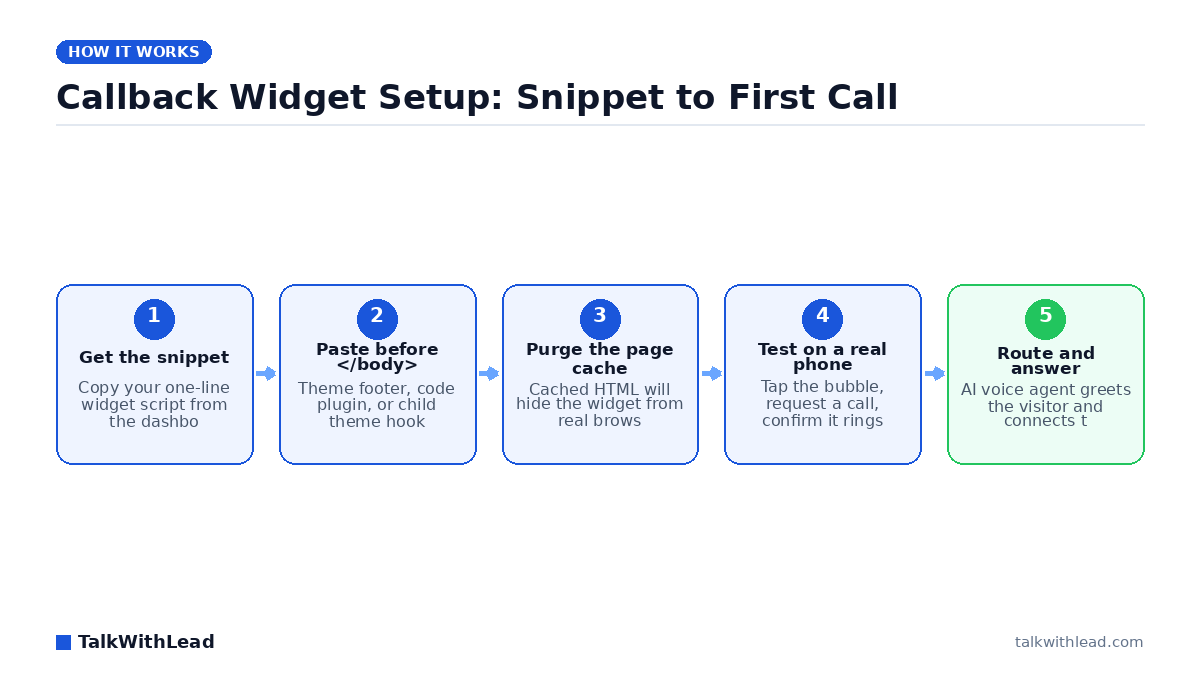
    Callback Widget Setup: Snippet to First Call — TalkWithLead original infographic (flow diagram).
    Callback Widget Setup: Snippet to First Call

    Adding a callback widget to WordPress is a ten-minute job. Most WordPress sites already earn traffic they never convert — visitors read a page, hesitate, and leave without ever picking up the phone. A callback widget closes that gap by turning a click into a live phone conversation.

    TL;DR: To add a callback widget to WordPress, copy the widget’s JavaScript snippet from your provider, paste it in the site head (or the header/footer field your platform provides), purge your page cache, then test the widget on a real mobile browser. TalkWithLead rings the visitor within seconds and an AI voice agent takes the conversation.

    What a callback widget actually does on a WordPress site

    A callback widget is a small floating element — usually a bubble in a bottom corner — that offers the visitor a phone conversation instead of a form. The visitor taps it, gives a number or asks to talk, and the system connects the call. No inbox. No “we’ll get back to you within one business day.”

    That distinction matters more than the install itself. A widget that just queues a phone number in a CRM is a contact form wearing a different costume. The version that earns its place on your site is the one that starts the conversation while the visitor is still on the page, still comparing you against two other tabs. If you are still weighing formats, our breakdown of callback widget vs click-to-call vs live chat lays out where each one wins.

    How do I add a callback widget to WordPress in 10 minutes?

    Here is the whole sequence. Nothing here requires a developer, and every step is reversible.

    1. Create the account and grab the snippet. Sign up, add your site domain, and copy the one-line script the dashboard gives you. Start with the free signup if you do not have a snippet yet. (~3 minutes)
    2. Decide where the code goes. Three safe options, in order of preference: a code-insertion plugin (WPCode, Insert Headers and Footers), your theme’s built-in header-scripts field, or a child theme’s wp_head hook. Never edit a parent theme’s template files directly — the next theme update erases the change. (~1 minute)
    3. Paste it in the site head. The snippet loads its own script asynchronously, so it stays off your render path and should not slow your Largest Contentful Paint. (~1 minute)
    4. Purge every cache layer. This is the step people skip and then file a support ticket about. Clear your WordPress page cache plugin, your host’s server cache, and your CDN. Cached HTML was generated before the snippet existed, so real browsers keep getting the old version even though the code is saved. (~2 minutes)
    5. Test on a real phone. Open the site on your own mobile browser — not just a desktop window resized narrow. Tap the widget, request a callback, and confirm your phone actually rings. (~3 minutes)

    If the widget does not appear after a purge, open your browser console and look for a Content Security Policy error or a script blocked by an optimization plugin. “Defer all JavaScript” and “Delay JS until interaction” settings in caching plugins are the two most common culprits. Add the widget domain to the exclusion list and it renders.

    What the snippet actually installs

    Before you paste anything, it is worth knowing what the code does once it is on the page. A callback widget is not an iframe and not a hosted landing page. It is a small script that builds its own interface inside your site.

    • One library and two account values. The TalkWithLead snippet loads Librarytwl.js from widgets.talkwithlead.com and carries two values that belong to your account: your user key, and the number the system dials on your side.
    • jQuery has to be there first. The library depends on jQuery. WordPress bundles jQuery and most themes load it on the front end, which is why WordPress installs tend to be the easy ones — but a lean or custom-built theme may not enqueue it at all. Check for it in your page source; if it is missing, include the jQuery tag above the snippet, as you would on a hand-built HTML page.
    • The head, and jQuery order is what matters. Paste the snippet in the site head — the header field your platform provides, or your theme’s header-scripts field. The loader appends its own asynchronous script at run time, so the widget stays off your render path, as long as jQuery has already loaded when the library runs.
    • It draws into your own page. On window load the script requests the widget configuration and injects the markup into your document rather than an iframe, so your own CSS applies to it, and so does anything on the page that stops JavaScript from running.
    • Any platform where you can add HTML to the head. WordPress through a header field, a code-insertion plugin or a child-theme hook; a hosted store or site builder through its code-injection setting; a static site by editing the template. The snippet itself is the same in each case.

    One JavaScript detail accounts for most silent failures: WP Rocket and Perfmatters both ship a setting that holds scripts back until a visitor interacts, and a held-back widget script renders nothing at all. The domain to put on that exclusion list is widgets.talkwithlead.com — the same cache trap as step 4, seen from the other side.

    What the visitor gets is a phone-number field with a country selector instead of a contact form. What you get is the call on the number you configured, with your own number shown as the caller ID, plus SMS and email notifications; call recording and emailed transcripts are available if you want the conversation on file.

    Plugin or code snippet: which install method should you use?

    Both work. Pick based on how much control you need over where the widget appears.

    DimensionCode snippet in the headCode-insertion plugin
    Setup time~2 minutes~5 minutes
    Survives theme updatesOnly via child themeYes
    Page-level show/hide rulesManual codeBuilt-in conditions
    Extra plugin to maintainNoneOne more
    Best forSitewide widgetLanding pages only

    Default to the snippet. Reach for the plugin when you want the widget on service pages but not on checkout, or when a non-technical teammate needs to toggle it without touching theme files.

    Every place a phone number can start a call

    The floating bubble is the obvious trigger. It is not the only one, and on a site with real forms it is usually not the busiest one. According to TalkWithLead, a phone number entered anywhere on your site — a contact or quote form, a checkout or abandoned-cart flow, any form with a phone field — or arriving from your CRM or another tool through the API, starts the same call.

    Where the number is enteredWhat the visitor doesWhat happens next
    Callback widgetOpens the bubble and enters a numberThe call goes out in seconds, while they are still on the page
    Contact or quote formSubmits a form that has a phone fieldAuto web form calls turn the submission into a call instead of an inbox entry
    Abandoned-cart or checkout flowLeaves a number, then leaves the pageThe number is treated as a callback request, not just a retargeting cookie
    Any other phone-capturing formDemo request, booking, quote request, event sign-upSame trigger: a number entered on your site starts a call
    CRM or another tool, through the APIA record with a phone number is created somewhere elseThe API accepts the number and the call goes out the same way

    The form, cart, CRM and API rows above are as stated by TalkWithLead rather than quoted from a published page. Two things can happen once the call is placed, and you decide which one per widget:

    • AI voice agent. This is the mode most customers run. The system rings the visitor, and an AI voice agent speaks with them: answering questions, collecting contact details and qualifying the lead, in more than 20 languages.
    • Human bridge. The system dials the visitor and your own team at the same time and puts the two people on one call, over a mobile, a landline or SIP, so a real person is talking to the lead while they are still on your site.

    What stays true in both modes: the call begins with something the visitor did on your website, never with a call placed to you.

    Why a widget that starts the call beats one that takes a message

    Installing the widget is the easy part. What decides whether it produces revenue is what happens in the sixty seconds after someone uses it.

    According to Harvard Business Review research, companies that reach a web lead within an hour are nearly 7× more likely to qualify it than those that wait even an hour longer. A callback widget that emails you a phone number does not deliver that hour — it delivers whenever you next check your inbox. On a Saturday afternoon, that could be Monday.

    TalkWithLead closes the loop on the widget’s own side. An AI voice agent picks up the request, greets the visitor by voice, asks what they need, and places the call immediately. It handles the conversation in more than 20 languages, so a Spanish-speaking visitor is not stuck reading English form labels. Free long-distance calling between supported countries means a prospect three time zones away costs you nothing extra to reach. You can try it yourself on the live demo page: enter your phone number there and take the callback.

    Best for: WordPress site owners who get real traffic, sell something worth a phone conversation, and cannot staff a live answering desk every hour their site is open.

    Not the right fit if: your product sells entirely self-serve at a low price point and a phone call would only add friction to the checkout.

    How much is a slow callback costing you?

    Run the arithmetic on your own numbers rather than trusting a generic benchmark. Here is an illustrative example, with every assumption stated:

    • Assume 2,000 monthly visitors to your service pages.
    • Assume 2% tap a callback widget — 40 requests a month.
    • Say even 1 in 4 of those requests goes unanswered until the next business day: 10 lost conversations.
    • Assume a 20% close rate and a $1,500 average job value: roughly $3,000 a month walking to a competitor.

    Those inputs are placeholders — swap in yours. The free missed-call revenue calculator does the math with your traffic, close rate, and ticket size. Compare the output against published pricing and the decision usually makes itself. For a deeper look at why the first minute carries so much weight, read how fast you should call a new lead.

    Five settings to configure before you call it done

    A default install works. A configured install converts. Spend ten more minutes here:

    • Trigger timing, if your widget offers it. Where a delay setting exists, hold the prompt until the visitor has scrolled or read for a moment. An overlay that lands before the visitor reads your headline gets dismissed on reflex.
    • Mobile placement. Check that the bubble does not cover your primary call-to-action button on a 375px-wide screen. Assume most of your callback requests arrive from phones.
    • Business hours and out-of-office behavior. Decide explicitly what a visitor who arrives at 11pm is offered. An AI voice agent taking that conversation beats a form that promises a reply.
    • Language handling. If your traffic is mixed, confirm the agent is set to the language your traffic speaks — more than 20 are supported.
    • Analytics events, where your own stack allows it. If your analytics setup can record a widget interaction — a GA4 event on open, say — wire it up so you can measure the widget instead of guessing about it.

    Chatbots and contact forms remain the slow alternative here: they collect text, hand you a transcript, and leave the actual selling for later. Voice skips that queue. If you want the side-by-side, see AI voice agent vs chatbot conversion rate.

    What a callback widget will not do

    The limits decide whether this belongs on your site at all, so here they are without the marketing varnish.

    • It does not answer your published business number. There is no inbound number and no call forwarding involved. Someone who dials the number on your business card still reaches whatever answers it today.
    • It cannot see a missed call. The widget is not in the path of your phone line, so missed-call text-back is not a thing it does, and nothing about your voicemail changes when you install it.
    • Every call starts with the visitor. There is no dialer and no uploaded list; the only call it places is the one a lead on your own site asked for.
    • It needs JavaScript to render. A visitor with scripts blocked, or a page where an optimization plugin never lets the script run, sees no widget at all.
    • The free plan is capped by calls, not by time. Basic includes 10 calls: enough to prove the flow on your own traffic, not enough to run a busy season on.

    Verify the install like a professional

    Before you move on, confirm four things from a clean browser session with cache disabled: the widget renders on your homepage and on a deep service page; tapping it produces an actual ring on your phone; PageSpeed Insights shows no meaningful regression in your Largest Contentful Paint; and your analytics records the open event.

    If all four pass, you are done. Every visitor who wants to talk gets a conversation instead of a confirmation message. Start on the Basic plan — $0, no credit card, a 14-day trial and 10 calls — paste one line of code, and see what your own traffic does with it. When 10 calls a month stops being enough, Standard is $99.99 USD a month for 100 calls and Advanced is $199.99 USD for 200, with every tier listed on the pricing page. If you would rather hear it first, try the self-serve callback demo: enter your phone number on the live demo page and take the call yourself.

    FAQ

    Where does the callback widget code go?

    In the site head — the header field your platform provides, or your theme’s header-scripts field. The widget loads its own asynchronous script at run time, so head placement does not put it on your render path. What matters just as much is that jQuery is available before the widget library loads, and that no optimization plugin is delaying the script until a visitor interacts.

    Can something other than the widget trigger the call?

    Yes. According to TalkWithLead, a phone number entered anywhere on your site can start the call: the widget, a contact or quote form, a checkout or abandoned-cart flow, or any other form with a phone field. A number that arrives from your CRM or another tool through the API triggers it the same way. The call is then taken by the AI voice agent or bridged to your own staff.

    How do I add a callback widget to WordPress without a plugin?

    Copy your provider’s JavaScript snippet and paste it into your theme’s header-scripts field, or add it to a child theme using the wp_head action hook. Then purge your page cache and CDN so browsers receive the updated HTML. No plugin is required for a sitewide widget.

    Will a callback widget slow down my WordPress site?

    Not meaningfully. The snippet loads its own script asynchronously, so it runs after your page content renders and should not affect Largest Contentful Paint. Verify with PageSpeed Insights before and after installing, and exclude the widget domain from any “delay JavaScript” setting that would break it.

    Why is my callback widget not showing up after I installed it?

    Nine times out of ten it is caching. Purge your WordPress cache plugin, your host’s server cache, and your CDN. If it still does not appear, check the browser console for a blocked script — optimization plugins that defer or delay JavaScript are the usual cause, and adding the widget domain to their exclusion list fixes it.

    Can a callback widget talk to visitors in other languages?

    With TalkWithLead, yes. The AI voice agent handles conversations in more than 20 languages (you choose the language; it is not detected mid-call). That matters on sites drawing multilingual traffic, where an English-only form quietly filters out qualified buyers.

    Is a callback widget better than live chat for a WordPress site?

    For anything sold through a conversation, usually yes. Chat requires typing, produces a transcript instead of a relationship, and stalls when nobody is staffing it. A callback widget backed by an AI voice agent gets the visitor into a real phone conversation in seconds, which is where deals actually close.

    What does a callback widget cost?

    TalkWithLead prices by the call rather than by the minute: every plan carries unlimited minutes inside each call, and free international calling between a published list of supported countries, pay-as-you-go elsewhere. Basic is $0 with no credit card and 10 calls; the paid tiers are listed on the pricing page. Run your own numbers through the missed-call calculator to see what the widget needs to recover to pay for itself.

Your next lead is on your site right now — ready to talk.

TalkWithLead’s AI voice agent rings that visitor back in seconds, qualifies the lead in their language, and books the call before the prospect can open a competitor’s tab. Forms are slow. Chatbots make people type. Voice closes.

Just curious about plans? See pricing →