TalkWithLead
AI Voice-First Lead Conversion

AI Voice Agents That Turn Website Visitors Into Real Conversations

TalkWithLead is the AI voice-first widget that turns a website visitor into a phone call. The visitor enters their number, the system rings them, and an AI voice agent talks with them — multilingual, extremely human-sounding, and free to call between a list of supported countries. More calls. More leads. More closed deals.

Extremely human-sounding voice 23 published languages out of the box Unlimited minutes on every plan Instant callback widget

Tag: website leads

  • AI Lead Qualification: How It Works for Leads From Your Website

    AI Lead Qualification: How It Works for Leads From Your Website

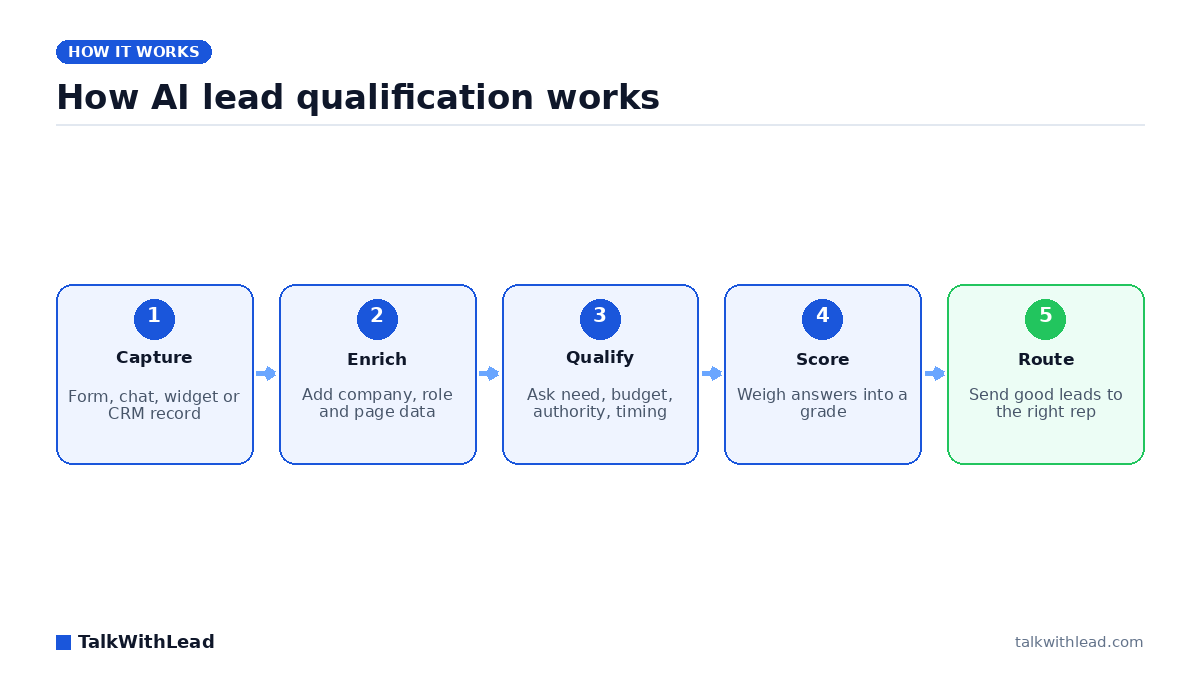
    How AI lead qualification works — TalkWithLead original infographic (flow diagram).
    How AI lead qualification works

    What is AI lead qualification?

    Every phone number typed into your website is a lead, but a form record can’t tell your sales team who is ready to buy and who is just browsing. AI lead qualification sorts the two. The method you choose decides what you learn about each lead, and how soon you learn it.

    Direct answer: AI lead qualification is software that decides whether a new lead is worth a salesperson’s time. It gathers and weighs need, budget, authority and timing (from form data, enrichment, a chat or a live conversation) and then routes the good leads to the right person. TalkWithLead is the conversation kind: a live phone call with a website lead, started when the lead enters a number.

    That makes TalkWithLead one narrow kind of AI lead qualification. It is not a CRM scoring or enrichment tool, and it does not grade the records already in your database. It has no inbound number, so calls people dial to your published business number never reach it. It also runs no calling campaigns. It only rings numbers that a lead entered on your site or that your CRM sends through the API.

    How AI lead qualification works

    Vendor guides and AI-assistant answers mostly describe the same five steps. Each step can be automated separately, and most tools cover only one or two.

    1. Capture. The lead arrives as a form fill, a chat, a demo request, a phone number typed into a widget, or a record pushed in from another system.
    2. Enrich. Software adds what the lead didn’t tell you, such as company size, industry, job title, location and the pages they viewed.
    3. Qualify. Someone or something asks the questions that matter and records the answers: what the lead needs, what they can spend, who decides and how soon.
    4. Score. The answers and the enriched data are combined into a grade, a number or a simple hot, warm or cold label.
    5. Route. Good leads go to the right rep with the context attached. Weak ones go to nurture or get closed out.

    People often confuse scoring with qualifying. Scoring works on a record. Nobody talks to the lead, and a model guesses intent from firmographics and behaviour. Qualifying happens in a conversation. The lead answers questions in their own words, and you learn things no form field captures, such as a current contract that ends on the 30th or a business partner who has to sign off. Much of the lead qualification AI in vendor guides is really scoring. Both are useful, but they answer different questions.

    Four ways to run AI lead qualification, compared

    Each approach learns different things about a lead, at a different moment, and asks the lead for different effort. Here are the four approaches side by side:

    ApproachWhat it learns about the leadWhen it happensWhat the lead has to doWhere it falls short
    Form scoring and enrichment toolsCompany size, industry, role, pages viewedIn the background after a form is submittedFill in a formInfers intent; never hears the lead’s own words
    Website chatbotTyped answers to scripted questionsWhile the visitor is on the pageType answers in a chat windowEasy to abandon; typed answers stay short
    AI voice call to the lead (the TalkWithLead approach)Spoken answers on need, budget, timing and who decidesSeconds after the lead enters a phone numberEnter a number and take the callNeeds a phone number; no record scoring or enrichment
    Human SDR callFull context, nuance and objectionsWhenever a rep is freeBe available when the rep callsLimited by rep hours and headcount

    You can combine these approaches. A team can score every record in the background and still want a real conversation with the leads who ask for one. What matters is who has that first conversation and how soon after the lead asks.

    What questions qualify a lead?

    BANT (budget, authority, need, timing) is still the usual framework, and it helps to add fit. Ask each part as a question a buyer will actually answer on a call, so the call doesn’t feel like an interrogation:

    • Need: “What made you reach out today?” and “What isn’t working with how you handle it now?”
    • Budget: “Is there a range you’re working to?” or “What do you pay for this today?”
    • Authority: “Who else will weigh in before you decide?”
    • Timing: “When do you need this in place?” and “Is anything setting that date, like a contract ending?”
    • Fit: “Where are you located?” and “How big is the job, the team or the space?”

    Here is an example of an AI voice agent calling a lead who has just asked for a quote.

    Illustrative dialogue: a fictional commercial cleaning company, not a real customer.

    AI voice agent: Hi, you just requested a cleaning quote on our website. Do you have two minutes?

    Visitor: Sure, go ahead.

    AI voice agent: What kind of space is it, roughly how big, and how often would you need cleaning?

    Visitor: Offices on two floors, about 6,000 square feet. Three nights a week.

    AI voice agent: When would you want to start, who signs off on the vendor, and is there a monthly budget you’re working to?

    Visitor: Our current contract ends on the 30th. I decide with our operations director, and we’d want to stay a little under what we pay now.

    AI voice agent: Thank you. I have the space, the schedule, your start date, the budget and both decision makers. All of it is going to the team now so they can prepare your quote.

    That one short call covered need, scope, a firm start date, the decision makers and a budget. Instead of a name and a number, the team gets a lead they can quote.

    Why speed decides how many leads you can qualify

    You can only qualify a lead you actually reach, and web leads lose interest fast. According to Harvard Business Review (March 2011), companies that respond to a web lead within an hour are nearly 7 times more likely to have a meaningful conversation with a decision maker than companies that wait even an hour longer. The Lead Response Management study (2007) found that contacting a web lead within 5 minutes instead of 30 makes you about 21 times more likely to qualify it.

    Illustrative example, not a result: say your site produces 200 form leads a month. Assume a rep calls back the next morning and reaches and qualifies 15% of them. That gives 30 qualified conversations. Now assume each lead gets a call within seconds, while they’re still on your site, and you reach and qualify an assumed 30%. That gives 60. With an assumed 20% close rate, the same traffic produces 6 new customers a month in the first case and 12 in the second. Every rate here is an assumption, so plug in your own.

    For how fast counts as fast enough, and what a realistic response window looks like, see Speed to Lead: How Fast Should You Call a New Lead?

    How TalkWithLead qualifies website leads

    TalkWithLead uses AI for lead qualification at one specific moment: the seconds after a website visitor gives you a phone number. A call is triggered when a visitor enters a number anywhere on your own site, whether in the TalkWithLead widget, a contact or quote form, or an abandoned-cart flow. A call is also triggered when a number arrives from your CRM or other software through the API. TalkWithLead then rings that number within seconds.

    You choose the mode before the call, and it decides what happens next:

    • AI voice agent mode (the mode most customers use): the AI voice agent speaks with the lead, asks qualifying questions and captures the answers.
    • Human mode: the system rings the visitor and your own staff at the same time, so the two people talk directly from the first second of the call.

    The TalkWithLead live demo page says the AI voice agent “can answer questions, collect contact details, qualify the lead, and help move that visitor closer to becoming a paying customer — even when you are busy, closed, or unavailable.” You can click the widget on that page and talk to it yourself.

    These published features are the ones that matter for qualification:

    • Custom fields on the widget ask the visitor for extra information before or after they request the call, so some qualifying details arrive with the phone number.
    • Call transcriptions by email let your team read what the lead actually said instead of relying on a summary field. Call recording is optional.
    • Callbacks shared across your reps: the callback can ring several of your reps at once or rotate among them round-robin.
    • Working hours you set: outside those hours, the widget offers a callback for when you’re back.
    • Your own number as caller ID, so the lead sees your business number instead of an unknown one.
    • More than 20 languages for leads who would rather talk in their own language.

    It is just as important to know what it doesn’t do. It doesn’t score records numerically or enrich firmographics. It qualifies leads in conversation and makes sure the details reach your people. When the AI voice agent takes the call, it can also book the appointment into your calendar.

    Who this is not for

    A phone call is the right qualification step for some leads and the wrong one for others. Check these limits before you choose:

    • It needs a phone number. A lead who only wants to type will not get a call.
    • It works on new leads as they arrive. It doesn’t work on the thousands of records already in your CRM.
    • It adds no company data. If you need firmographics, you need an enrichment tool.
    • It doesn’t dial lists. It runs no calling campaigns and no outreach to purchased lists, and it doesn’t text leads.
    • It has no inbound number and no call forwarding. Calls people dial to your published business number never reach it.
    • The AI can’t switch a call over to a person partway through. You choose AI mode or human mode before the call starts.

    Best for: businesses whose websites produce inbound leads such as quote requests, demo requests, consultation forms and abandoned carts, and who want each lead qualified in a real conversation within seconds rather than the next business day.

    Not the right fit if: you need to score thousands of existing CRM records, enrich firmographics or dial purchased lists, or you want coverage for the calls people dial to your main business number.

    How to choose an AI lead qualification approach

    Pick the approach that matches where your leads come from and what you need to learn about them:

    • A large CRM backlog with little context on each record: start with form scoring and enrichment.
    • Visitors who prefer typing, and simple questions with short answers: a website chatbot can collect the basics.
    • Website leads who give a phone number and need a real answer on price, scope or timing: an AI voice call within seconds of the request.
    • High-value, complex deals where objections decide the sale: a human SDR who calls quickly, or human mode, which rings your rep and the lead together.
    • A mix of the above: score records in the background, qualify by voice and give your reps the transcript.

    If you’re comparing voice vendors, this buyer’s guide to AI voice agents for small business sets out what to check.

    On price, TalkWithLead plans are priced by calls, not by the minute. Basic is $0 with no credit card and includes 10 calls, 1 widget and a 14-day free trial. Standard is $99.99 USD a month for 100 calls. The paid plans go up to Enterprise at $599.99 USD a month for 800 calls, and each paid plan requires a card and also includes a 14-day trial. The pricing page has every plan. To hear an AI voice agent qualify leads from your own website, start on the free Basic plan.

    FAQ

    What is AI lead qualification?

    It is software that decides whether a new lead is worth a salesperson’s time. It gathers and weighs need, budget, authority and timing from form data, enrichment, a chat or a live conversation, and then routes the good leads to the right rep.

    How does AI qualify leads?

    It follows a capture, enrich, qualify, score and route workflow. Some tools score a record without any conversation. Others qualify leads by asking questions in a chat or on a phone call and recording the answers.

    Can AI qualify leads over the phone?

    Yes. An AI voice agent can call a lead who has just entered a phone number on your website, ask about need, budget, timing and who decides, and send the details to your team. TalkWithLead works this way: it rings the lead within seconds and emails the call transcription to your team.

    Is AI lead qualification better than a human SDR?

    It depends, because they do different jobs. An AI voice agent can call every website lead within seconds, including outside business hours, in more than 20 languages. A human SDR brings judgement, rapport and objection handling to complex deals. Many teams use AI to reach and qualify leads quickly and save their people for the conversations that need them.

    What questions should I ask to qualify a lead?

    Cover need, budget, authority, timing and fit in plain language. Ask what made them reach out, what range they’re working to, who else decides, when they need it in place and how big the job is. Ask one or two questions at a time so the call feels like a conversation.

    Does TalkWithLead score or enrich leads in my CRM?

    No. TalkWithLead qualifies website leads in a live phone conversation and emails your team the transcription. It doesn’t score records or enrich firmographics, so pair it with other tools if you need those jobs done. It does connect to your CRM through its API, so a new lead entered there can trigger the call.
  • Best AI Voice Agent for Small Business: General Buyer’s Guide

    Best AI Voice Agent for Small Business: General Buyer’s Guide

    An AI voice agent for a small-business website is software that holds a spoken conversation with a visitor and turns that visit into a phone call. TalkWithLead’s widget runs in one direction: a visitor types their number on your site, the system rings that visitor, and an AI voice agent talks with them. Switch the same widget to human mode and it bridges the visitor to your rep instead. It never answers calls placed to your business number.

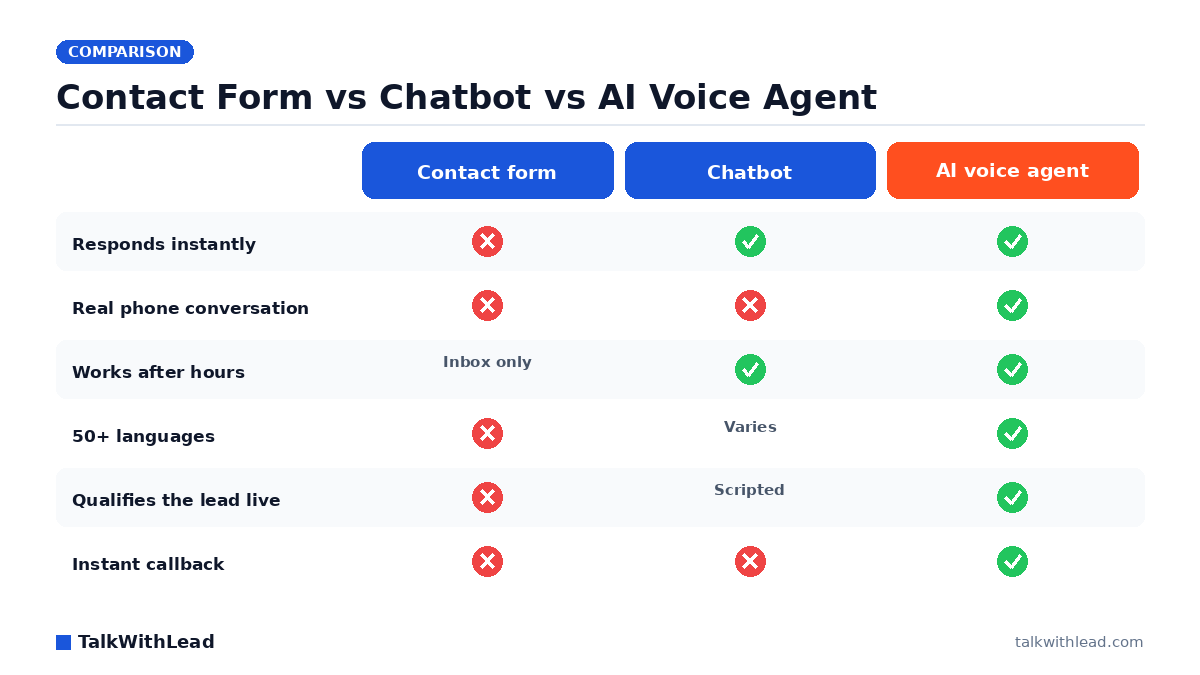
    Contact Form vs Chatbot vs AI Voice Agent — TalkWithLead original infographic (comparison diagram).
    Contact Form vs Chatbot vs AI Voice Agent

    What is an AI voice agent, and what does ours actually do?

    The phrase covers a lot of ground, and that vagueness is where buyers get burned. Under the label “AI voice agent” you will find developer platforms that run a company’s phone lines, outbound dialers built for sales teams, and on-page widgets like ours. They share the speech engine and almost nothing else. Before you compare vendors, work out which of those jobs you are hiring for, because the wrong shelf wastes a month.

    Ours is the on-page kind. A visitor on your website clicks the widget and enters a phone number. TalkWithLead calls that number, and a conversational AI voice agent picks up the other end and talks with them — it can, in the company’s own words on the live demo page, “answer questions, collect contact details, qualify the lead, and help move that visitor closer to becoming a paying customer — even when you are busy, closed, or unavailable.” The agent speaks 23 published languages, English, Spanish, French, German, Hindi and Arabic among them.

    The second mode is the human bridge. Same widget, same visitor-typed number, except the system dials your rep at the same time and puts the two people on one call over a mobile, landline or SIP line. Which mode a widget uses is your choice; every plan includes both.

    What matters for choosing is the thing both modes have in common: the visitor starts the call, from your website, and the number we dial is the visitor’s. That single design decision explains everything this tool is good at and everything it cannot do.

    It is also the reason speed is the whole game here. According to Harvard Business Review research, companies that reach a web lead within an hour are nearly 7× more likely to qualify it than those that wait even an hour longer. A widget that rings the visitor while they are still reading your page is operating inside that window by construction; an email reply the next morning is not. For the qualifying half of that call in detail, see how AI lead qualification works on a website callback.

    Screen recording of the TalkWithLead callback widget on our own live-demo page, made by our team on September 16, 2026. This is our product, not a customer’s call. Nothing is submitted and no call is placed in the clip.

    Four ways voice AI for business gets deployed

    Feature grids are useless here because the products differ structurally, not by feature count. Most roundups of AI voice agents for business list all four of the models below side by side as if they were interchangeable, which is how buyers end up on the wrong shelf. The question that actually separates them is mechanical: who starts the call, and whose phone rings. Sort the market that way and the shortlist writes itself.

    Deployment modelWho starts the callWhat number is dialledWhat the business has to haveBest for
    On-page AI voice-agent callback widget
    TalkWithLead; CallPage also pairs a widget with an AI agent
    The website visitor, from a page on your siteThe visitor’s own number, typed into the widgetA widget script on the site. No number to buy or port. For human mode, a mobile, landline or SIP line for the repTurning traffic you already have into phone conversations
    Phone-line AI voice agent platform
    Retell AI, Vapi
    Either side — both vendors document inbound and outbound callingA number you buy or connect on the platform; inbound callers dial itA purchased or ported number or SIP trunk, plus dashboard or developer setup (API keys, CLI)Businesses that want their published line answered, or programmatic outbound calling
    Website chatbot or live chat widget
    Tidio
    The visitor, by typingNone — the exchange stays typedA widget script on the siteFast typed answers and support deflection
    Human callback widget
    CallPage; TalkWithLead’s human mode
    The visitor, by leaving a numberBoth the visitor’s number and a rep’s number, bridged into one callA widget script, plus a rep free to pick upTeams with people available during the hours their traffic arrives
    Deployment models for AI voice agents on a small-business website. Competitor rows observed on 6 September 2026 from each vendor’s own public pages; sources below.

    How the competitor rows were checked, and what is missing. Every cell above comes from the vendor’s own published pages, read on 6 September 2026. Nothing is inferred from third-party roundups, and where a vendor’s public pages did not state something, it is left out of the table rather than guessed. Two things are genuinely undocumented anywhere public and so are deliberately absent: the per-conversation price each platform charges at small-business volumes, and how quickly each connects a website visitor specifically. Both vary by configuration; ask each vendor directly rather than trusting a grid.

    • Retell AI — docs.retellai.com, Introduction, observed 6 Sep 2026: “Retell is a platform to build, test, deploy, and monitor AI voice and chat agents with telephony, prompts, tools, and analytics built in.” Its deploy section lists “Purchase phone number”, “Make & receive phone calls” and a website widget.
    • Vapi — docs.vapi.ai, Phone calls quickstart, observed 6 Sep 2026: “Vapi makes it easy to build voice agents that can make and receive phone calls.” The quickstart steps are create an assistant, “Set up a phone number”, then make inbound and outbound calls, with API keys or the CLI for programmatic use.
    • CallPage — callpage.io, observed 6 Sep 2026: “Visitors leave their phone number to request an instant callback or schedule a call for later. The system connects the available rep and the potential customer in seconds — or the AI Agent takes over.”
    • Tidio — tidio.com, Live Chat, observed 6 Sep 2026: a typed chat widget — “Support customers in real-time with the #1 ecommerce live chat app.”
    • TalkWithLead — the live demo page and pricing page, observed 5 September 2026: “When a visitor clicks the blue phone widget on your website, they get connected to your AI Voice Agent,” and, for the human mode, “When a visitor clicks the widget and enters their phone number, TalkWithLead can automatically call you and connect you with that visitor while they are still live on your website.”

    If your shortlist is really widget-versus-widget rather than platform-versus-widget, the narrower breakdown in click-to-call vs callback widget vs AI voice agent goes a level deeper on the three on-page options.

    What it costs, and ROI math you can check yourself

    TalkWithLead prices by call volume on a flat monthly plan, not by the minute. The Basic plan is $0 with no payment method required and includes 10 calls, one widget, unlimited minutes and both the human and AI voice agent; paid plans start at $99.99 USD a month and step up by call allowance. Every plan gets a 14-day free trial, and the paid ones require a card while Basic does not. The pricing page carries the current numbers and the plan-by-plan detail. If you are budgeting across vendors rather than ours alone, what an AI voice agent actually costs per month sets the published entry prices of the developer platforms and the plan products side by side, each with the date it was read.

    Two caveats worth reading before you budget. Ten calls is a trial allowance, not a free tier you can run a business on. And international calling is free between a published list of supported countries, with pay-as-you-go rates elsewhere — check that your market is on the list rather than assuming.

    What follows is an illustrative scenario with assumed rates — not a customer result, not an average, and not a promise. Suppose your average new customer is worth $600 and your site produces 40 enquiries a month. Imagine that 1 in 4 of them arrive when nobody can respond quickly, so 10 leads a month go cold. If a voice agent turns 3 of those into live conversations and you close one, that single rescued customer covers a mid-tier monthly plan several times over. Change any assumption and the answer changes — which is the point of running it on your own numbers in the free missed-call revenue calculator or the speed-to-lead ROI calculator instead of trusting ours.

    Who this is NOT for

    Skipping this section is how trials end in a refund request. Four jobs people regularly try to hire an on-page voice agent for, and it does none of them:

    • Answering your published business line. There is no inbound number and no call forwarding. Point your printed phone number at TalkWithLead and nothing happens — the product is not in that call path at all. If what you want is your own line answered, you want a phone-line platform or an answering service, and you should stop reading here. The AI voice agent vs human receptionist comparison lays out that trade-off.
    • Missed-call text back is not something we do. Because we never sit in front of your phone line, we cannot detect that a call to it went unanswered and cannot text the caller afterwards. A tool that promises this has to be inside your telephony; we are not.
    • Cold outbound campaigns. Every call starts with a visitor on your website typing their own number. There is no list upload, no dialer, no way to have the agent phone people who never asked. That is a deliberate limit, not a missing feature.
    • SMS conversations with visitors. SMS here is a notification to you when a lead comes in. It is not a channel your visitor can hold a conversation in, and it is not a texting inbox.

    One more honest limit: no published page says the AI agent can transfer a live caller to a person mid-conversation, or that it can pick up a caller’s language and change to it part-way through a call. Treat both as absent until a vendor page says otherwise — ours included.

    What to look for when choosing the best AI voice agent

    Once you know which shelf you are shopping on, the evaluation gets short. Six things separate the tools that earn their subscription from the ones that quietly stop being used:

    • Does the conversation end in a phone call? If the agent’s best outcome is “I’ll pass your message along”, you have bought voicemail with better manners.
    • Whose phone rings, and who dials? Ask this first, in these words. It resolves in one sentence whether the vendor is on your shelf, and it is the question most demo calls never reach.
    • What does it cost at your volume? Per-minute billing makes your best month your biggest invoice. Flat, allowance-based pricing is easier to plan against — check where your real monthly call count lands on the plan ladder before you sign.
    • Does it hold a conversation, or read a menu aloud? A decision tree with a voice bolted on breaks the moment someone asks something off-script. Test it with a question you did not prepare.
    • Which languages, actually published? Vendors quote language counts loosely. Ask for the list, then check that the two or three languages your market speaks are on it.
    • How long until it is live? A widget script goes on a site in an afternoon. A phone-line platform with a ported number and developer setup does not.

    And judge the whole category on one number: extra booked conversations per month. Not features, not language counts, not a demo that sounded impressive. If you want to see how the on-page approach compares with the text tools it usually replaces, the AI voice agent vs chatbot breakdown covers that head-to-head, and how fast you should call a new lead covers the timing evidence.

    Is an AI voice agent worth it for your small business?

    Worth trying if: the best AI voice agent for small business use, in your case, is one that works your existing website traffic — you get real visitors, your revenue depends on inbound enquiries, and the deals close over the phone. Contractors, law firms, clinics, brokers, agencies and local service businesses all fit that shape, and so does any team whose visitors arrive in more than one language.

    Not worth it if: your traffic is thin enough that you personally answer every enquiry within minutes, your sales complete in an e-commerce checkout with no conversation, or what you actually need is your published phone line answered. In the first two cases, keep your money. In the third, buy a different category.

    The honest way to decide is to hear it. Try the live demo and talk to the agent yourself — if it does not sound good enough to represent your business, no feature list will fix that. Then run your own numbers in the calculator, and if the math holds, start on the free Basic plan, which costs $0 and needs no card. Ten calls is enough to find out whether visitors will talk to it.

    FAQ

    What is an AI voice agent?

    An AI voice agent is software that speaks with a person over a phone or browser call instead of exchanging typed messages: it understands what the caller says, answers in a synthesised voice, and follows the goal it was configured for — qualifying a lead, answering questions, collecting contact details. The category splits by where the call comes from. Some run a company’s phone line; ours runs from a widget on the company’s website and calls the visitor.

    What is the best AI voice agent for small business?

    There is no single answer, because the products do different jobs. If the job is converting website visitors into phone conversations, look at on-page voice-agent widgets, TalkWithLead among them. If the job is answering the calls people place to your published number, look at phone-line platforms such as Retell AI or Vapi instead — they document buying or connecting a number and receiving inbound calls, which an on-page widget does not do. Decide the job first; the shortlist follows. For the developer platforms themselves — Vapi, Retell AI, Bland AI, Synthflow and ElevenLabs Agents — how the shortlist compares on published pricing and setup is broken out separately.

    Can an AI voice agent answer my business phone number?

    Not TalkWithLead’s. There is no inbound number, no forwarding and no missed-call detection — every call begins with a visitor on your website entering their number, and the number we dial is theirs. Platforms built around telephony do answer inbound calls; that is a different product category with different setup and different pricing.

    How much does an AI voice agent cost per month?

    TalkWithLead’s Basic plan is $0 with no payment method required and includes 10 calls; paid plans begin at $99.99 USD a month and are priced by call allowance rather than by the minute, with a 14-day free trial on every plan. Other vendors price per minute or per conversation, which is why two quotes can look similar and bill very differently at volume. Current figures are on the pricing page.

    How many languages can a conversational AI voice agent speak?

    Ours publishes 23 languages, including Arabic, Dutch, English, French, German, Hindi, Italian, Japanese, Korean, Polish, Portuguese, Spanish, Turkish and Vietnamese. Treat every vendor’s language count as a list to be checked rather than a headline number, and confirm that the specific languages your market speaks are on it. Nothing published says the agent detects and switches language part-way through a call, so assume it does not.

    Can an AI voice agent really sound human?

    Judge that yourself rather than taking anyone’s word for it — including ours. The live demo exists precisely so you can click the widget, take the call, and decide in the first two sentences whether it sounds like something you would put in front of your own prospects.

    Is an AI voice agent better than a chatbot for getting leads?

    They do different things. A chatbot collects typed details and hands you a follow-up task; a voice agent puts the visitor into a spoken conversation immediately, while their interest is highest. For businesses that close over the phone, the voice route removes a step. For businesses that close in a checkout, the chatbot is often enough.

    Do I need technical skills to add an AI voice agent to my website?

    For an on-page widget, no — it installs as a snippet, the same effort as adding a live chat box, and the real work is business configuration: what you offer, what the agent should ask, where the conversation goes next. Phone-line platforms are a different story; their own quickstarts involve buying or connecting a number, API keys and, optionally, a command-line tool.

    Will an AI voice agent work outside business hours?

    A website visitor can request a call whenever they are on your site, and the AI agent can speak with them even when you are busy, closed or unavailable. Working hours are configurable, and outside them the widget can instead tell the visitor you are closed and offer a callback for when you are back. What it never does is answer calls placed to your own line at night — that is a different product.

  • Smith.ai Alternative for Website Lead Conversion

    Smith.ai Alternative for Website Lead Conversion

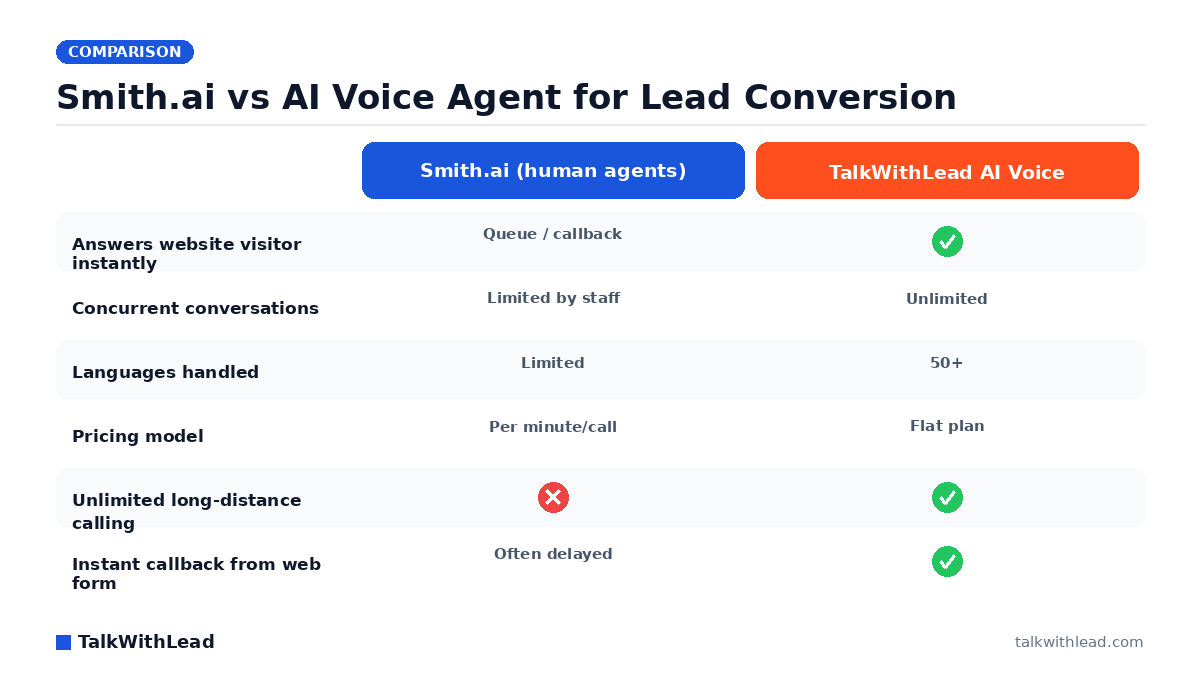
    Smith.ai vs AI Voice Agent for Lead Conversion — TalkWithLead original infographic (comparison diagram).
    Smith.ai vs AI Voice Agent for Lead Conversion

    Why business owners look for a Smith.ai alternative for website lead conversion

    You put a real phone number and a contact form on your site, signed up for Smith.ai to catch the calls, and the leads still trickle in slower than you want. The gap is rarely the agents themselves. It’s that a human-staffed answering service can only pick up so many calls at once, charges by the minute, and still leaves your website visitors waiting for someone to call them back. If you want a Smith.ai alternative for website lead conversion that talks to every visitor the instant they land, an AI voice-first platform answers that directly.

    TL;DR: Smith.ai is a human virtual receptionist and answering service billed per call or minute. The fastest-converting alternative is an AI voice agent that answers your website’s visitors instantly, holds a natural spoken conversation in more than 20 languages, and triggers an immediate callback so a form-fill becomes a live phone call in seconds, all on a flat plan instead of per-minute fees.

    What does Smith.ai actually do, and where does it leave money on the table?

    Smith.ai connects your business to trained human receptionists who answer calls, qualify callers, and book appointments. For a firm that just needs missed phone calls covered, it works. The trouble starts when you measure it against the goal that matters: turning the traffic already hitting your website into booked conversations.

    Three structural limits show up fast:

    • It waits to be called. A receptionist answers an inbound ring. The visitor reading your pricing page right now has to decide to dial, then hope someone’s free. Most never do.
    • It bills by the minute. Every qualifying question, every hold, every transfer is metered. Busy months get expensive, so owners cap usage and miss calls anyway.
    • It throttles at peak. When five leads hit at once, humans queue them. The fourth and fifth caller hear hold music or get a callback later, which is exactly when buyers move on.

    Speed is the whole game here. According to Harvard Business Review research, companies that reach a web lead within an hour are nearly 7× more likely to qualify it than those that wait even an hour longer. A callback queue burns that hour. We dig deeper into this in Speed-to-Lead: Why the First 60 Seconds Win Most Deals.

    What is the best Smith.ai alternative for website lead conversion?

    The best alternative is the one that removes the wait entirely. Instead of routing a visitor toward a human who may or may not be available, TalkWithLead puts an extremely human-sounding AI voice agent directly on your website. A visitor clicks to talk, and within seconds they’re in a real spoken conversation, no form, no hold, no slow chatbot typing back one line at a time.

    That changes the math in four concrete ways:

    • Instant answer, every time. The AI voice agent never queues. Whether one visitor or fifty arrive at once, each gets a live conversation immediately.
    • more than 20 languages, on the fly. A Spanish-speaking buyer and an English-speaking buyer both get answered in their own language without you staffing for either.
    • Free long-distance calling between supported countries. Prospects anywhere can reach you, and the agent can call them back, without per-minute long-distance charges eating the margin.
    • Instant callbacks. When a visitor leaves a number, the system rings them back in seconds while their interest is still hot, turning a passive form-fill into an active phone conversation.

    Want to hear it before you decide? Take the live demo and talk to the agent the way your own visitors would. For a side-by-side on conversion specifically, AI Voice Agent vs Chatbot: Which One Books More Calls? breaks down why voice beats typed chat for booking.

    Smith.ai vs an AI voice agent: a side-by-side comparison

    Here’s how the two stack up on the dimensions that decide whether a website visitor becomes a sales conversation.

    DimensionSmith.ai (human answering service)TalkWithLead (AI voice-first)
    Who answersHuman receptionistHuman-sounding AI voice agent
    Response to a website visitorInbound call or scheduled callbackInstant on-page conversation
    Concurrent conversationsLimited by staffingUnlimited, simultaneous
    LanguagesLimited setmore than 20 languages
    Long-distance callingOften meteredUnlimited
    PricingPer call / per minuteFlat plan
    AvailabilityBusiness hours + plans24/7, no shift gaps

    Best for: a business with steady inbound website traffic that wants every visitor engaged in a real conversation the moment they arrive, in any language, without per-minute costs scaling against you.

    Not the right fit if: your lead flow is almost entirely complex calls that legally or practically require a licensed human (for example, certain regulated intake), and you specifically want a person, not an AI, on every first touch. In that case a human service like Smith.ai may suit you better, or you pair the two.

    How much does an AI voice agent cost versus a per-minute answering service?

    Per-minute pricing punishes exactly the months you grow. An AI voice-first platform flips that to a predictable flat plan, so a busy week costs the same as a slow one. You can see the public tiers on the pricing page.

    To make the ROI concrete, here’s an illustrative example (your numbers will differ). Say your site gets 1,000 visitors a month and, picture a setup where even 3 of every 100 visitors would talk to an instant voice agent. That’s roughly 30 live conversations a month you weren’t capturing before. If even a handful of those become customers at a few hundred dollars each, the flat plan pays for itself many times over, and every additional conversation after that is pure upside. Plug your own traffic and close rate into the free missed-call revenue calculator to see the gap for your business.

    There’s a trust angle too. According to a Five9 study of 4,000 US and UK consumers, 75% of people prefer talking to a real human over the phone for support. A natural-sounding voice conversation meets that preference far better than a typed chatbot does, which is the whole point of leading with voice instead of a chat widget. Ready to put it on your site? Start your free signup and have the agent live before your next traffic spike.

    Does this work for my industry?

    The pattern holds anywhere a fast phone conversation closes the deal. A law firm fielding consultation requests, a med spa booking appointments, a real estate team chasing showing requests, an insurance agency quoting policies, every one of them loses leads to slow follow-up. The AI voice agent answers the moment interest peaks instead of hours later.

    If you run a practice or agency, these breakdowns get specific: Smith.ai Alternative for Law Firms covers website intake, Is an AI Receptionist Worth It for a Law Firm? weighs the cost, and Speed to Lead Real Estate shows how instant callbacks book more showings. For the broader build-vs-buy view on people, AI Voice Agent vs Human Receptionist lays out the tradeoffs.

    FAQ

    What is the best Smith.ai alternative for converting website visitors?

    An AI voice-first platform like TalkWithLead is the strongest alternative when your goal is converting website traffic, because it calls back every visitor instantly with a natural spoken conversation rather than routing them to a human queue or a callback. It handles unlimited simultaneous calls in more than 20 languages on a flat plan.

    How is an AI voice agent different from Smith.ai?

    Smith.ai staffs human receptionists who answer inbound calls and bill per minute. An AI voice agent lives on your website, starts a live conversation the instant a visitor clicks, never queues at peak, supports more than 20 languages, and runs on a predictable flat plan with free long-distance calling between supported countries.

    Is an AI voice agent cheaper than a per-minute answering service?

    For most websites with steady or growing traffic, yes, because a flat plan doesn’t scale costs against your busiest months the way per-minute billing does. Run your own traffic and close rate through the missed-call revenue calculator to compare against your current spend.

    Can an AI voice agent really handle leads in other languages?

    Yes. The TalkWithLead voice agent converses in more than 20 languages automatically, so a visitor is answered in their own language without you hiring multilingual staff or buying separate plans per language.

    Will visitors know they’re talking to AI?

    The voice agent is built to sound natural and human, and it handles real back-and-forth conversation rather than scripted prompts. Many businesses pair it with instant callbacks so the visitor moves seamlessly into a phone conversation, which most people prefer over typing to a chatbot.

    Can I keep human receptionists and add an AI voice agent?

    Yes. Many businesses use the AI voice agent as the always-on first responder that engages every website visitor instantly, and run the widget in human mode for the complex or high-value enquiries, so a person is on the call from the start. That captures the leads a queue would have lost while keeping people on the calls that truly need them.

Your next lead is on your site right now — ready to talk.

TalkWithLead’s AI voice agent rings that visitor back in seconds, qualifies the lead in their language, and books the call before the prospect can open a competitor’s tab. Forms are slow. Chatbots make people type. Voice closes.

Just curious about plans? See pricing →