TalkWithLead
AI Voice-First Lead Conversion

AI Voice Agents That Turn Website Visitors Into Real Conversations

TalkWithLead is the AI voice-first widget that turns a website visitor into a phone call. The visitor enters their number, the system rings them, and an AI voice agent talks with them — multilingual, extremely human-sounding, and free to call between a list of supported countries. More calls. More leads. More closed deals.

Extremely human-sounding voice 23 published languages out of the box Unlimited minutes on every plan Instant callback widget

Author: TalkWithLead Editorial Team

  • AI Lead Qualification: How It Works for Leads From Your Website

    AI Lead Qualification: How It Works for Leads From Your Website

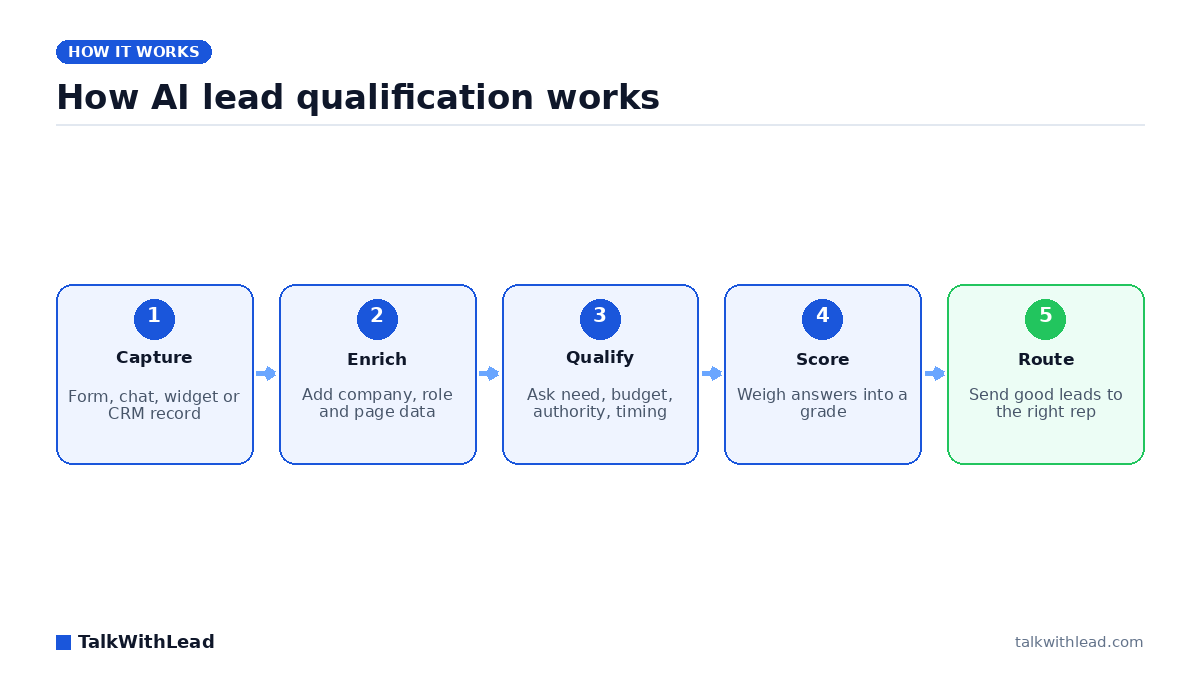
    How AI lead qualification works — TalkWithLead original infographic (flow diagram).
    How AI lead qualification works

    What is AI lead qualification?

    Every phone number typed into your website is a lead, but a form record can’t tell your sales team who is ready to buy and who is just browsing. AI lead qualification sorts the two. The method you choose decides what you learn about each lead, and how soon you learn it.

    Direct answer: AI lead qualification is software that decides whether a new lead is worth a salesperson’s time. It gathers and weighs need, budget, authority and timing (from form data, enrichment, a chat or a live conversation) and then routes the good leads to the right person. TalkWithLead is the conversation kind: a live phone call with a website lead, started when the lead enters a number.

    That makes TalkWithLead one narrow kind of AI lead qualification. It is not a CRM scoring or enrichment tool, and it does not grade the records already in your database. It has no inbound number, so calls people dial to your published business number never reach it. It also runs no calling campaigns. It only rings numbers that a lead entered on your site or that your CRM sends through the API.

    How AI lead qualification works

    Vendor guides and AI-assistant answers mostly describe the same five steps. Each step can be automated separately, and most tools cover only one or two.

    1. Capture. The lead arrives as a form fill, a chat, a demo request, a phone number typed into a widget, or a record pushed in from another system.
    2. Enrich. Software adds what the lead didn’t tell you, such as company size, industry, job title, location and the pages they viewed.
    3. Qualify. Someone or something asks the questions that matter and records the answers: what the lead needs, what they can spend, who decides and how soon.
    4. Score. The answers and the enriched data are combined into a grade, a number or a simple hot, warm or cold label.
    5. Route. Good leads go to the right rep with the context attached. Weak ones go to nurture or get closed out.

    People often confuse scoring with qualifying. Scoring works on a record. Nobody talks to the lead, and a model guesses intent from firmographics and behaviour. Qualifying happens in a conversation. The lead answers questions in their own words, and you learn things no form field captures, such as a current contract that ends on the 30th or a business partner who has to sign off. Much of the lead qualification AI in vendor guides is really scoring. Both are useful, but they answer different questions.

    Four ways to run AI lead qualification, compared

    Each approach learns different things about a lead, at a different moment, and asks the lead for different effort. Here are the four approaches side by side:

    ApproachWhat it learns about the leadWhen it happensWhat the lead has to doWhere it falls short
    Form scoring and enrichment toolsCompany size, industry, role, pages viewedIn the background after a form is submittedFill in a formInfers intent; never hears the lead’s own words
    Website chatbotTyped answers to scripted questionsWhile the visitor is on the pageType answers in a chat windowEasy to abandon; typed answers stay short
    AI voice call to the lead (the TalkWithLead approach)Spoken answers on need, budget, timing and who decidesSeconds after the lead enters a phone numberEnter a number and take the callNeeds a phone number; no record scoring or enrichment
    Human SDR callFull context, nuance and objectionsWhenever a rep is freeBe available when the rep callsLimited by rep hours and headcount

    You can combine these approaches. A team can score every record in the background and still want a real conversation with the leads who ask for one. What matters is who has that first conversation and how soon after the lead asks.

    What questions qualify a lead?

    BANT (budget, authority, need, timing) is still the usual framework, and it helps to add fit. Ask each part as a question a buyer will actually answer on a call, so the call doesn’t feel like an interrogation:

    • Need: “What made you reach out today?” and “What isn’t working with how you handle it now?”
    • Budget: “Is there a range you’re working to?” or “What do you pay for this today?”
    • Authority: “Who else will weigh in before you decide?”
    • Timing: “When do you need this in place?” and “Is anything setting that date, like a contract ending?”
    • Fit: “Where are you located?” and “How big is the job, the team or the space?”

    Here is an example of an AI voice agent calling a lead who has just asked for a quote.

    Illustrative dialogue: a fictional commercial cleaning company, not a real customer.

    AI voice agent: Hi, you just requested a cleaning quote on our website. Do you have two minutes?

    Visitor: Sure, go ahead.

    AI voice agent: What kind of space is it, roughly how big, and how often would you need cleaning?

    Visitor: Offices on two floors, about 6,000 square feet. Three nights a week.

    AI voice agent: When would you want to start, who signs off on the vendor, and is there a monthly budget you’re working to?

    Visitor: Our current contract ends on the 30th. I decide with our operations director, and we’d want to stay a little under what we pay now.

    AI voice agent: Thank you. I have the space, the schedule, your start date, the budget and both decision makers. All of it is going to the team now so they can prepare your quote.

    That one short call covered need, scope, a firm start date, the decision makers and a budget. Instead of a name and a number, the team gets a lead they can quote.

    Why speed decides how many leads you can qualify

    You can only qualify a lead you actually reach, and web leads lose interest fast. According to Harvard Business Review (March 2011), companies that respond to a web lead within an hour are nearly 7 times more likely to have a meaningful conversation with a decision maker than companies that wait even an hour longer. The Lead Response Management study (2007) found that contacting a web lead within 5 minutes instead of 30 makes you about 21 times more likely to qualify it.

    Illustrative example, not a result: say your site produces 200 form leads a month. Assume a rep calls back the next morning and reaches and qualifies 15% of them. That gives 30 qualified conversations. Now assume each lead gets a call within seconds, while they’re still on your site, and you reach and qualify an assumed 30%. That gives 60. With an assumed 20% close rate, the same traffic produces 6 new customers a month in the first case and 12 in the second. Every rate here is an assumption, so plug in your own.

    For how fast counts as fast enough, and what a realistic response window looks like, see Speed to Lead: How Fast Should You Call a New Lead?

    How TalkWithLead qualifies website leads

    TalkWithLead uses AI for lead qualification at one specific moment: the seconds after a website visitor gives you a phone number. A call is triggered when a visitor enters a number anywhere on your own site, whether in the TalkWithLead widget, a contact or quote form, or an abandoned-cart flow. A call is also triggered when a number arrives from your CRM or other software through the API. TalkWithLead then rings that number within seconds.

    You choose the mode before the call, and it decides what happens next:

    • AI voice agent mode (the mode most customers use): the AI voice agent speaks with the lead, asks qualifying questions and captures the answers.
    • Human mode: the system rings the visitor and your own staff at the same time, so the two people talk directly from the first second of the call.

    The TalkWithLead live demo page says the AI voice agent “can answer questions, collect contact details, qualify the lead, and help move that visitor closer to becoming a paying customer — even when you are busy, closed, or unavailable.” You can click the widget on that page and talk to it yourself.

    These published features are the ones that matter for qualification:

    • Custom fields on the widget ask the visitor for extra information before or after they request the call, so some qualifying details arrive with the phone number.
    • Call transcriptions by email let your team read what the lead actually said instead of relying on a summary field. Call recording is optional.
    • Callbacks shared across your reps: the callback can ring several of your reps at once or rotate among them round-robin.
    • Working hours you set: outside those hours, the widget offers a callback for when you’re back.
    • Your own number as caller ID, so the lead sees your business number instead of an unknown one.
    • More than 20 languages for leads who would rather talk in their own language.

    It is just as important to know what it doesn’t do. It doesn’t score records numerically or enrich firmographics. It qualifies leads in conversation and makes sure the details reach your people. When the AI voice agent takes the call, it can also book the appointment into your calendar.

    Who this is not for

    A phone call is the right qualification step for some leads and the wrong one for others. Check these limits before you choose:

    • It needs a phone number. A lead who only wants to type will not get a call.
    • It works on new leads as they arrive. It doesn’t work on the thousands of records already in your CRM.
    • It adds no company data. If you need firmographics, you need an enrichment tool.
    • It doesn’t dial lists. It runs no calling campaigns and no outreach to purchased lists, and it doesn’t text leads.
    • It has no inbound number and no call forwarding. Calls people dial to your published business number never reach it.
    • The AI can’t switch a call over to a person partway through. You choose AI mode or human mode before the call starts.

    Best for: businesses whose websites produce inbound leads such as quote requests, demo requests, consultation forms and abandoned carts, and who want each lead qualified in a real conversation within seconds rather than the next business day.

    Not the right fit if: you need to score thousands of existing CRM records, enrich firmographics or dial purchased lists, or you want coverage for the calls people dial to your main business number.

    How to choose an AI lead qualification approach

    Pick the approach that matches where your leads come from and what you need to learn about them:

    • A large CRM backlog with little context on each record: start with form scoring and enrichment.
    • Visitors who prefer typing, and simple questions with short answers: a website chatbot can collect the basics.
    • Website leads who give a phone number and need a real answer on price, scope or timing: an AI voice call within seconds of the request.
    • High-value, complex deals where objections decide the sale: a human SDR who calls quickly, or human mode, which rings your rep and the lead together.
    • A mix of the above: score records in the background, qualify by voice and give your reps the transcript.

    If you’re comparing voice vendors, this buyer’s guide to AI voice agents for small business sets out what to check.

    On price, TalkWithLead plans are priced by calls, not by the minute. Basic is $0 with no credit card and includes 10 calls, 1 widget and a 14-day free trial. Standard is $99.99 USD a month for 100 calls. The paid plans go up to Enterprise at $599.99 USD a month for 800 calls, and each paid plan requires a card and also includes a 14-day trial. The pricing page has every plan. To hear an AI voice agent qualify leads from your own website, start on the free Basic plan.

    FAQ

    What is AI lead qualification?

    It is software that decides whether a new lead is worth a salesperson’s time. It gathers and weighs need, budget, authority and timing from form data, enrichment, a chat or a live conversation, and then routes the good leads to the right rep.

    How does AI qualify leads?

    It follows a capture, enrich, qualify, score and route workflow. Some tools score a record without any conversation. Others qualify leads by asking questions in a chat or on a phone call and recording the answers.

    Can AI qualify leads over the phone?

    Yes. An AI voice agent can call a lead who has just entered a phone number on your website, ask about need, budget, timing and who decides, and send the details to your team. TalkWithLead works this way: it rings the lead within seconds and emails the call transcription to your team.

    Is AI lead qualification better than a human SDR?

    It depends, because they do different jobs. An AI voice agent can call every website lead within seconds, including outside business hours, in more than 20 languages. A human SDR brings judgement, rapport and objection handling to complex deals. Many teams use AI to reach and qualify leads quickly and save their people for the conversations that need them.

    What questions should I ask to qualify a lead?

    Cover need, budget, authority, timing and fit in plain language. Ask what made them reach out, what range they’re working to, who else decides, when they need it in place and how big the job is. Ask one or two questions at a time so the call feels like a conversation.

    Does TalkWithLead score or enrich leads in my CRM?

    No. TalkWithLead qualifies website leads in a live phone conversation and emails your team the transcription. It doesn’t score records or enrich firmographics, so pair it with other tools if you need those jobs done. It does connect to your CRM through its API, so a new lead entered there can trigger the call.
  • Bland AI Pricing: Plans, Per-Minute Costs, When a Callback Fits

    Bland AI Pricing: Plans, Per-Minute Costs, When a Callback Fits

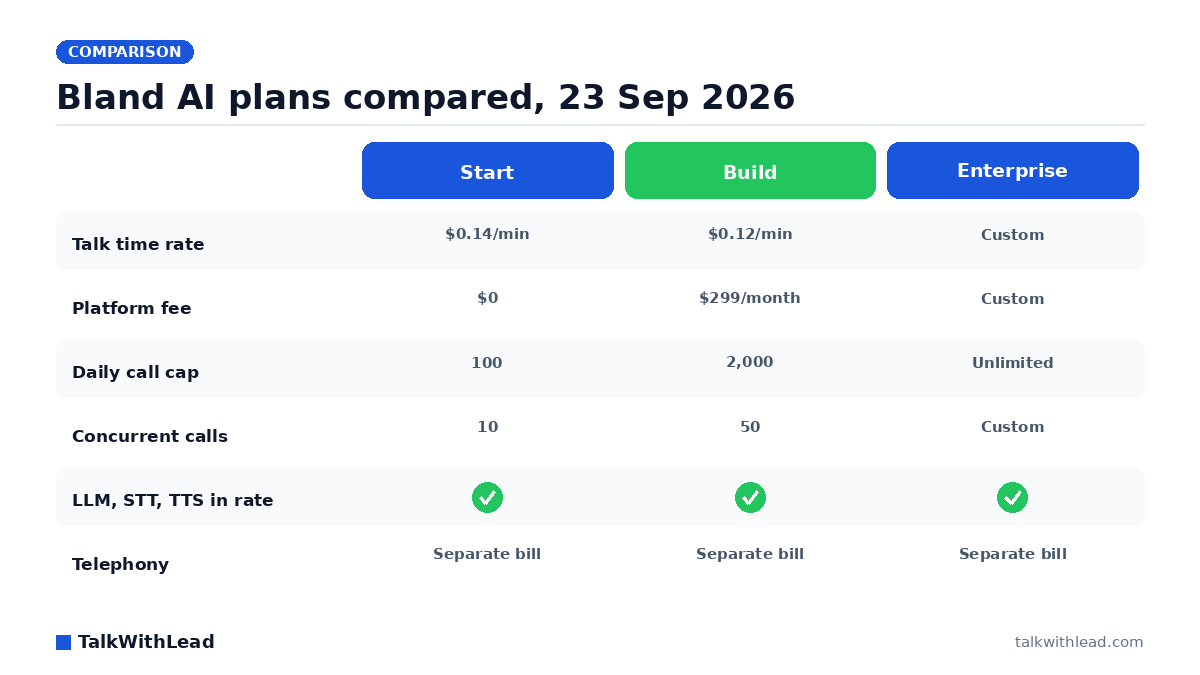
    Bland AI plans compared, 23 Sep 2026 — TalkWithLead original infographic (comparison diagram).
    Bland AI plans compared, 23 Sep 2026

    How much does Bland AI cost?

    Bland AI pricing looks simple: each plan has a per-minute rate and a platform fee. The real monthly bill adds telephony and a separate transfer-time charge, and call caps can decide your plan before the rate does.

    Direct answer: As of 23 September 2026, Bland’s pricing page lists three plans. Start costs $0.14 per minute with a $0 platform fee and no card required. Build costs $0.12 per minute plus a $299 per month platform fee. Enterprise is custom. The per-minute rate includes the LLM, speech-to-text and text-to-speech. Telephony is billed separately.

    Every Bland figure below was read from that page on 23 September 2026 and is reported the way Bland prints it. Pricing pages can change without notice, so check the live page before you commit a budget.

    Bland AI plans compared (observed 23 September 2026)

    Bland describes Start as “for developers”, Build as “for teams” and Enterprise as “for organizations”. The table shows every published rate and limit for each plan.

    PlanTalk time ratePlatform feeTransfer time rateDaily call capHourly call capConcurrent callsVoicesKnowledge bases
    Start$0.14 per minute$0$0.05 per minute10010010110
    Build$0.12 per minute$299 per month$0.04 per minute2,0001,00050550
    EnterpriseCustomCustomCustomUnlimitedUnlimitedCustomUnlimitedUnlimited

    A few terms are not in the table. Start needs no card. Signing up gives you 2 credits and an inbound number, which Bland values at $15 per month. Enterprise rates and concurrency are custom and set by contract according to volume. Enterprise can also include on-prem or VPC deployment, a forward deployed engineer, a BAA, SSO and data residency. Bland prints a 99.9% uptime SLA for all tiers.

    On timing, Bland’s FAQ says most teams deploy a first agent within a day on the self-serve plans. Enterprise deployments follow a 28-day deployment framework. On security, Bland states SOC 2 Type I and Type II, HIPAA eligibility with a BAA, GDPR and PCI DSS. Those are Bland’s own statements; this page has not verified them.

    What the per-minute rate includes – and what it does not

    Bland’s per-minute rate covers three things: the LLM, with no token charges; real-time speech-to-text; and premium text-to-speech voices. The model the agent runs on does not come with a separate token bill.

    Three costs are billed outside that rate:

    • Telephony. Billed separately. You can use your own carrier or Bland’s built-in Twilio at pass-through cost. Bland also works with an existing Twilio account or SIP trunks.
    • Transfer time. A separate per-minute charge on Bland’s price list: $0.05 per minute on Start and $0.04 per minute on Build. Bland says customers who bring their own telephony pay no transfer fees. This page uses “transfer time” only as the name of a billing line. Check Bland’s documentation for what counts toward it.
    • The platform fee. $0 on Start, $299 per month on Build and custom on Enterprise. On Build it is a fixed monthly charge on top of the minutes.

    To budget, multiply your talk minutes by the plan rate, then add the platform fee, telephony and any transfer minutes. Only the first two are fixed by the pricing page. Telephony depends on your carrier and the calls you make.

    What Bland AI costs at real volumes

    The calculations below use Bland’s list rates from 23 September 2026 and count talk minutes only. Telephony and transfer time are left out because both depend on your setup.

    Illustrative example, not a quote: a team expects 2,000 talk minutes a month on Start. 2,000 × $0.14 = $280 a month, with no platform fee.

    Illustrative example, not a quote: the same 2,000 talk minutes on Build. 2,000 × $0.12 = $240, plus the $299 platform fee = $539 a month.

    Illustrative example, not a quote: Build saves $0.02 on every minute, so its $299 fee is paid back at 14,950 talk minutes a month ($299 ÷ $0.02). Below that volume, Start’s list rates give the smaller talk-time bill. Above it, Build’s do.

    The caps can decide the plan before the price does. Start allows 100 calls a day, 100 calls an hour and 10 concurrent calls. Build raises those limits to 2,000 a day, 1,000 an hour and 50 concurrent. Illustrative example, not a quote: assume calls average three minutes. Start’s cap of 100 calls a day then allows at most 9,000 talk minutes in a 30-day month (100 × 30 × 3). That is well below the 14,950-minute break-even, so in this case the cap, not the rate, moves a team to Build. Size the plan on your busiest day and busiest hour first, then compare prices.

    How Bland’s pricing compares with Vapi and Retell – by Bland’s own account

    Bland’s FAQ includes its own comparison. According to Bland’s pricing page, Vapi lists $0.05 per minute and Retell about $0.07 per minute, and both figures cover voice infrastructure only. With typical providers added, Bland estimates the total at roughly $0.13-$0.30 per minute on Vapi and $0.11-$0.25 per minute on Retell.

    These are Bland’s estimates, published by a company that competes with both. They are not our figures, and this page did not re-check Vapi’s or Retell’s prices. The real difference is how the prices are built. Bland puts the LLM, speech-to-text and text-to-speech into one rate. By Bland’s account, the Vapi and Retell headline rates leave those providers to be billed on top, so the total changes with the model, voice and carrier you choose.

    For the vendors’ own pricing pages, see our dated comparison of AI voice agent pricing across callback products and programmable platforms. If Vapi is on your shortlist, Vapi alternatives: developer platforms and callback options separates the platforms you build on from the products that do one fixed job.

    None of these vendors comes out ahead on paper. A fair comparison needs your own average call length, provider choices and daily peak, checked against each vendor’s live page.

    When you do not need a voice platform at all

    Bland, Vapi and Retell are platforms for building voice agents. You design the agent, supply or rent telephony, and pay for every minute it talks. Some teams looking up Bland AI pricing have a much narrower job in mind: calling back, quickly, the people who leave a phone number on their website. A different kind of product fits that job.

    Speed is why that job matters. According to Harvard Business Review research (March 2011), companies that reach a web lead within an hour are nearly 7× more likely to qualify it than those that wait even an hour longer.

    TalkWithLead does that one job. A visitor enters a phone number anywhere on your own website: the widget, a contact or quote form, or an abandoned-cart flow. A number can also come from your CRM or other software through the API. TalkWithLead then calls that number within seconds. Most customers let the AI voice agent speak with the person. In human mode, the system calls the visitor and your own staff at the same time, so the two people talk directly. The live demo page says the AI voice agent “can answer questions, collect contact details, qualify the lead, and help move that visitor closer to becoming a paying customer – even when you are busy, closed, or unavailable.”

    Published features include:

    • custom fields on the widget, to ask for extra details before or after the visitor requests the call
    • optional call recording, with transcripts sent by email
    • callbacks that ring several of your reps at once or take turns in round-robin order
    • working hours you set; outside them, the widget offers a callback for when you are back
    • your own number as caller ID
    • an API for sending in numbers from other software
    • conversations in more than 20 languages

    The pricing works differently too. Plans are priced by the number of calls. There is no per-minute meter, no LLM bill and no telephony bill:

    • Basic: $0, no payment method, 10 calls, 1 widget, 14-day free trial
    • Standard: $99.99 USD a month, 100 calls, 3 widgets
    • Advanced: $199.99 USD a month, 200 calls, 4 widgets
    • Professional: $299.99 USD a month, 400 calls, 6 widgets
    • Enterprise: $599.99 USD a month, 800 calls, 15 widgets

    Paid plans need a card and also come with a 14-day trial. The full details are on the TalkWithLead pricing page. Illustrative example, not a result: a site that gets 100 callback requests a month fits the Standard plan at $99.99 USD a month, however long each conversation runs.

    TalkWithLead is not a developer platform. There is nothing to build, no inbound number and no calling campaigns or list dialing. It has no call forwarding and no missed-call detection, and it does not text leads. Calls to the phone number on your site keep reaching you just as they do today. To hear it, open the live demo and enter your number in the widget. The AI voice agent will call you.

    Who this is not for

    TalkWithLead has real limits, and they matter if you came here to price Bland:

    • You cannot design, script or deploy your own voice agents with it.
    • It gives you no inbound number for people to dial.
    • It does not run outbound calling campaigns. It only calls numbers that come from your website, CRM or API.
    • It does not give you the developer-level control over the agent that Bland’s plans are built around.
    • It does not write to your calendar or update your CRM, and the Basic plan stops at 10 calls.

    Best for: a business that wants every phone number left on its website, whether in the widget, a contact or quote form, or an abandoned cart, called back within seconds by an AI voice agent or its own staff, for a fixed price per plan based on the number of calls.

    Not the right fit if: you are building your own voice agents, need an inbound number, run outbound calling campaigns or need Bland-style developer controls. For that work, choose Bland, Vapi or Retell.

    If your job is the narrow one, Basic is $0 with no credit card, 10 calls and a 14-day trial: start on the Basic plan. If it is not, take the arithmetic above to Bland’s live page and size Start or Build on your busiest day.

    FAQ

    How much does Bland AI cost per minute?

    As of 23 September 2026, Bland charges $0.14 per minute of talk time on Start and $0.12 per minute on Build. Enterprise rates are custom. The rate includes the LLM, speech-to-text and text-to-speech. Telephony is billed separately.

    Is Bland AI free?

    Start has a $0 platform fee and needs no card, but every talk minute is billed at $0.14. Signing up gives you 2 credits and an inbound number, which Bland values at $15 per month.

    What is Bland AI’s platform fee?

    $0 on Start, $299 per month on Build and custom on Enterprise, according to Bland’s pricing page on 23 September 2026. On Build, the fee is paid back by the lower per-minute rate at 14,950 talk minutes a month.

    Does Bland AI charge for telephony?

    Yes, separately from the per-minute rate. You can use your own carrier or Bland’s built-in Twilio at pass-through cost. Bland also works with an existing Twilio account or SIP trunks.

    What are transfer minutes on Bland AI?

    Transfer time is a separate billing line on Bland’s price list: $0.05 per minute on Start and $0.04 per minute on Build. Bland says customers who bring their own telephony pay no transfer fees. Check Bland’s documentation for what counts toward it.

    Is Bland AI cheaper than Vapi?

    The two price in different ways, so the headline rates do not compare directly. Bland’s own FAQ says Vapi lists $0.05 per minute for voice infrastructure only and estimates about $0.13-$0.30 per minute once typical providers are added. That is Bland’s estimate, not ours. The real answer depends on your call length, provider choices and volume, so neither one is cheaper in every case.

  • AI Voice Agent Pricing: Callback Products vs Programmable Platforms

    AI Voice Agent Pricing: Callback Products vs Programmable Platforms

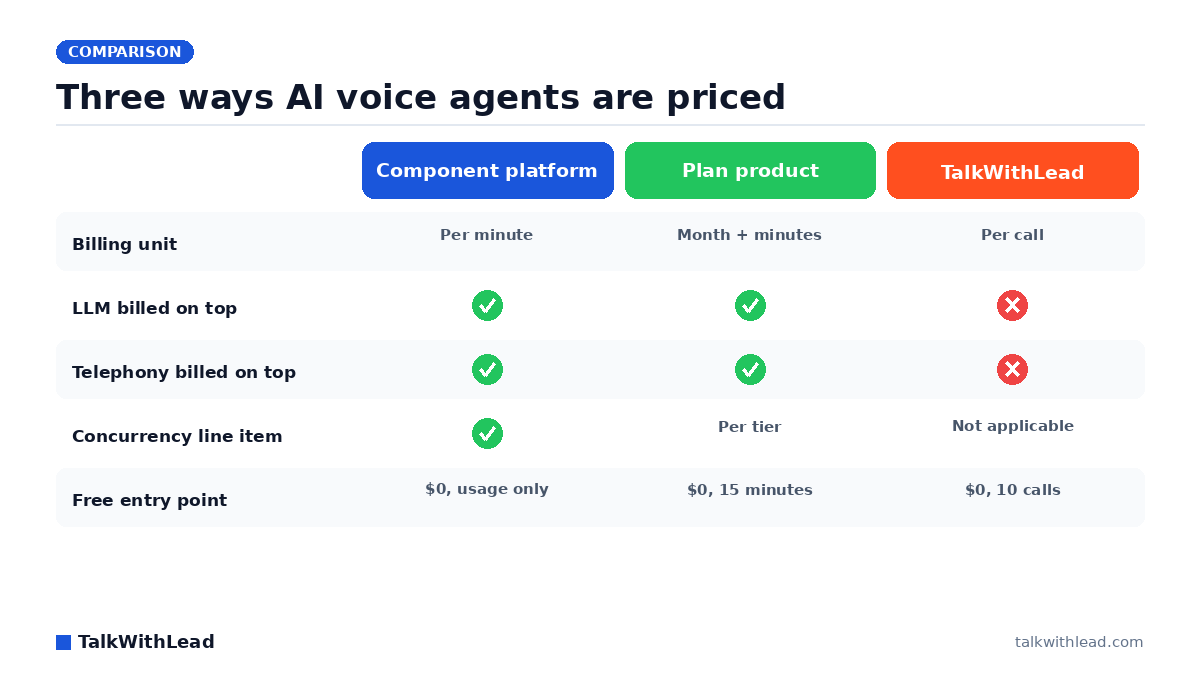
    Three ways AI voice agents are priced — TalkWithLead original infographic (comparison diagram).
    Three ways AI voice agents are priced

    What AI voice agent pricing looks like in September 2026

    Search for a monthly budget number and you get two kinds of answers that do not add up to each other. Some vendors quote a fee per minute before you add the models that do the talking; others quote a flat plan with minutes included. That is why ai voice agent pricing is confusing on first contact, and why this page starts with the shape of the market rather than a single figure.

    Direct answer (every figure below read from the vendor’s own pricing page as of 15 September 2026): Component platforms charge their own fee per minute, from $0.05 (Vapi) to $0.055 (Retell AI), before the language model, voice and telephony you add. Bundled per-minute pricing runs $0.12 to $0.14 per minute plus telephony (Bland AI). Plan products run $0 to $990 per month with included minutes (ElevenLabs Agents). TalkWithLead prices by calls, not minutes, from $0, for one narrow job: ringing back the leads that arrive through your own website.

    To be equally plain about what TalkWithLead is not: it is not a developer platform, there is no agent to build — the API only triggers a callback, there is no inbound number at all, and it runs no calling campaigns. If you need any of those, the platforms below are the right place to look, and this page will not steer you away from them.

    Two pricing models: component platforms versus plan products

    Most ai voice agent software is sold either as components or as a plan. A component platform sells the plumbing. You pay the platform’s own per-minute fee, then pay separately for speech-to-text, the language model, text-to-speech and the phone line, usually at each provider’s list price. Vapi publishes exactly this structure: each component at the provider’s listed price with no markup, plus a flat $0.05 per minute hosting fee. Retell AI does the same with a $0.055 per minute voice infrastructure charge, then adds text-to-speech, an LLM rate by model and telephony on top.

    A plan product sells a monthly price with usage included. ElevenLabs Agents lists tiers from $0 to $990 per month, each with a pool of call minutes and a concurrency limit, and bills extra minutes at a flat rate. Bland AI sits between the two: one bundled per-minute rate covers the LLM, speech-to-text and text-to-speech, but telephony is still billed separately. For Bland on its own, tier by tier with its call caps, see Bland AI pricing explained.

    The consequence is simple. A $0.05 platform fee and a $99 plan are not comparable until you have priced every component each vendor bills separately, and a plan’s included minutes mean nothing until you know how long your average call lasts. The small-business AI voice agent guide covers capability fit; this page stays on price.

    AI voice agent pricing compared: six options side by side

    Every figure below was read from the vendor’s own pricing page on 15 September 2026. Where a vendor does not publish a figure, the cell says so.

    OptionPricing modelPublished entry price (observed 15 September 2026)What the published price includesConcurrent calls includedWhat you add
    VapiComponent, per minute$0 to start, usage only; $0.05 per minute hosting feeHosting; components at provider list price with no markup; 1 phone number4Transcription, LLM, voice, transport; optional success packages
    Retell AIComponent, per minute$0 to start with $10 in free credits; $0.055 per minute voice infrastructureVoice infrastructure only; no platform fee20Text-to-speech, LLM by model, telephony; phone numbers $2.00 per month
    Bland AIBundled, per minuteStart: $0.14 per minute, $0 platform feeLLM, speech-to-text and text-to-speech, no token charges10 on Start, 50 on BuildTelephony at pass-through cost; Build adds a $299 per month platform fee
    SynthflowEnterprise contractFrom $30,000 annuallyScoped around volume, concurrency, telephony, integrations, security and launch supportNot documentedNot documented; no self-serve tier on the pricing page
    ElevenLabs AgentsPlan, monthly with included minutesFree $0 per month (15 minutes); paid from $6 per monthIncluded call minutes per tier; extra minutes $0.08 per minute4 on Free, 40 on BusinessLLM usage and telephony at cost; burst minutes $0.16 per minute
    TalkWithLeadPlan, monthly by call volumeBasic $0, no payment method, 10 calls; paid from $99.99 USD per monthAI and human voice agent, unlimited minutes per call, forms, notifications, recording, APINot applicable – priced per callNothing: no LLM, telephony or concurrency line items

    How much does an AI voice agent cost per month?

    It depends on which model you are buying into, so here are the published facts per vendor, dated, with each vendor’s own page linked so you can re-check them.

    Vapi (vapi.ai/pricing, observed 15 September 2026):

    • Flat $0.05 per minute hosting fee; speech-to-text, LLM, text-to-speech and transport at the provider’s listed price with no markup.
    • $0 to start, pre-paid usage, 4 concurrent calls, 1 included phone number, no minimum minutes, no cap on agents or minutes.
    • Component ranges printed on the page: Deepgram transcription $0.0095-$0.0099 per minute, OpenAI model $0.0077-$0.0452 per minute, ElevenLabs voice $0.0146-$0.0238 per minute; transport free on Vapi SIP, $0.008 per minute inbound and $0.014 per minute outbound on Twilio.
    • Optional success packages buy support, SLAs, concurrency and compliance, never minutes: Core $29 per month (10 concurrent calls, 5 phone numbers); Pro at one-tenth of the Vapi hosting fee with a $999 per month minimum (30 concurrent calls, 10 phone numbers); Premier custom, direct sales only. Add-ons: extra concurrency $10 per line per month, extra organizations $20 per organization per month.
    • Vapi’s own estimate for 1,000 minutes per month on its default stack with no success package is $82-$129 per month. That estimate is Vapi’s, not ours.

    Retell AI (retellai.com/pricing, observed 15 September 2026):

    • Pay-as-you-go from $0 with $10 in free credits, no platform fee, no minimums, no contracts.
    • Marketed at $0.07-$0.31 per minute, assembled from Retell voice infrastructure at $0.055 per minute, text-to-speech at $0.015 per minute for platform voices or $0.040 per minute for ElevenLabs voices, and an LLM rate by model on the standard tier (GPT 4.1 at $0.045 per minute, GPT 5.5 at $0.16 per minute).
    • Telephony separate: Retell-provided US Twilio numbers at $0.015 per minute, bring-your-own SIP trunking at no charge from Retell, phone numbers $2.00 per month.
    • 20 concurrent calls included; additional concurrency $8.00 per concurrent call per month. Billing is tracked to the nearest second on accumulated minutes, and Retell states that silence and hold time are billed because speech-to-text stays active. Enterprise is custom.

    Bland AI (bland.ai/pricing, observed 15 September 2026):

    • Start: $0.14 per minute, $0 platform fee, no card required, 10 concurrent calls, 100 calls per day.
    • Build: $0.12 per minute plus a $299 per month platform fee, 50 concurrent calls, 2,000 calls per day.
    • One rate covers the LLM, speech-to-text and text-to-speech with no token charges; telephony is billed separately on your own carrier or Bland’s at pass-through cost. Enterprise is a custom contract.

    Synthflow (synthflow.ai/pricing, observed 15 September 2026):

    • One published option: enterprise contracts from $30,000 annually, scoped around call volume, concurrency, telephony setup, integrations, security needs and launch support. A self-serve tier is not documented on the pricing page.

    ElevenLabs Agents (elevenlabs.io/pricing/agents, observed 15 September 2026):

    • Free $0 per month (15 minutes, 4 concurrent); Starter $6 per month (75 minutes, 6 concurrent); Creator $22 per month (275 minutes, 10 concurrent); Pro $99 per month (1,238 minutes, 20 concurrent); Scale $299 per month (3,738 minutes, 30 concurrent); Business $990 per month (12,375 minutes, 40 concurrent); Enterprise custom.
    • Additional minutes $0.08 per minute on every tier and burst pricing above your concurrency limit at $0.16 per minute. The LLM and any telephony are billed separately on usage, telephony at cost, and ElevenLabs states its prices exclude taxes.

    TalkWithLead (pricing page, read 7 September 2026):

    • Basic $0, no payment method required, 10 calls, 1 widget, 14-day free trial. Standard $99.99 USD a month (100 calls, 3 widgets); Advanced $199.99 USD a month (200 calls, 4 widgets); Professional $299.99 USD a month (400 calls, 6 widgets); Enterprise $599.99 USD a month (800 calls, 15 widgets). Paid plans need a card and also include a 14-day trial.
    • Priced by call volume, with unlimited minutes per call and no per-minute meter.

    Illustrative example, not a quote: assume 300 website leads a month, an average conversation of 4 minutes, and a component stack on Retell AI using a platform voice, GPT 4.1 on the standard tier and a Retell-provided US number. Per minute that is $0.055 + $0.015 + $0.045 + $0.015 = $0.13, so 1,200 minutes come to about $156, plus $2.00 for the number, before any extra concurrency. Change the model, the voice, the call length or the carrier and the figure moves; that is the whole point of pricing the components first.

    Why TalkWithLead prices by the call, not the minute

    TalkWithLead does a narrower job than the platforms above, and the pricing follows the job. According to TalkWithLead, a visitor enters a phone number somewhere on your own site — the widget, a contact or quote form, an abandoned-cart flow — or a number reaches TalkWithLead from your CRM or another tool through the API. TalkWithLead then rings that lead. Either the AI voice agent speaks with them, in more than 20 languages, or, in human mode, the widget rings the visitor and your own staff together so both are on the call from its first second.

    That is the whole trigger model. TalkWithLead never answers a call placed to your published business number; there is no inbound number, there are no calling campaigns, and there is nothing to build. Because every call starts from a lead your site already captured, the unit that matters is the call, not the minute. Every plan includes unlimited minutes per call, the human and the AI voice agent, unlimited websites, automatic calls from web forms, your own number as caller ID, SMS and email notifications to you, call recording and transcripts, integrations and an API, and free international calling between a published list of supported countries with pay-as-you-go elsewhere. Cancel anytime.

    Speed is the reason the job is worth paying for at all. According to Harvard Business Review research, companies that reach a web lead within an hour are nearly 7× more likely to qualify it than those that wait even an hour longer. A per-call plan turns that into one fixed monthly line: Basic is $0 with no credit card, 10 calls and a 14-day trial, and the paid tiers are listed in USD on the pricing page. Try the self-serve callback demo before you decide anything: enter your phone number on the live demo page and take the call yourself.

    Which plan your own call volume lands on

    Because the unit is the call, the only input you need is how many of your web leads you expect to ring back in a month. These are the published USD figures, read from the pricing page; every tier carries unlimited minutes inside each call, both voice modes, auto web form calls, your own number as caller ID, SMS and email notifications, integrations and the API, and free international calling between a published list of countries.

    PlanPrice per monthCalls includedWidgetsTo start
    Basic$0101No payment method
    Standard$99.99 USD1003Card required
    Advanced$199.99 USD2004Card required
    Professional$299.99 USD4006Card required
    Enterprise$599.99 USD80015Card required

    Illustrative arithmetic, not a quote: say 80 of your web leads a month ask to be called. Standard covers them at $99.99 USD for 100 calls, which is about a dollar a call with no meter running inside the conversation. Price those same 80 conversations on the component stack costed above, at $0.13 a minute and a four-minute average, and you are near $42 in usage: cheaper on the meter, before you add the build, the telephony account, the model choice and the hours that keep them working. That is the real trade on this page, and which side of it you want depends on whether you are buying an outcome or a toolkit. Swap in your own lead count and average call length before you decide.

    What you install, and what installing it involves

    Setup effort is a real line in a voice-agent budget and the per-minute tables never show it. On a component platform you are building: prompts, functions, a telephony account, a deployment, then the maintenance of all four. Here you are pasting a script.

    • One snippet. It loads Librarytwl.js from widgets.talkwithlead.com and carries two values belonging to your account: your user key, and the number to dial on your side.
    • jQuery is a prerequisite. WordPress already ships it; a stripped-back theme or a hand-built page needs the jQuery tag above the snippet.
    • Head placement, any platform. The snippet goes in the site head (or the header/footer field your platform provides) — any platform where you can add HTML to the head will carry it, from a WordPress header field or code-insertion plugin to a hosted store or site builder’s code-injection setting, or the template of a static HTML site — and the loader adds its own asynchronous script at run time, so it stays off your render path.
    • It draws into your page, not an iframe. On window load the script fetches its configuration and injects the widget into your document, so your CSS applies to it. So does any performance plugin that delays JavaScript until a visitor interacts, which is the usual reason a correctly pasted widget never appears; excluding widgets.talkwithlead.com from that setting fixes it.
    • Forms and CRMs need no extra code. Auto web form calls cover a phone number typed into forms you already have, and the API covers a number that arrives from a CRM or another tool.

    There is no model to choose, no voice to license, no telephony account to open and no concurrency to size. Less control than a platform, far less to build, and one monthly figure instead of a stack of meters.

    Who this is not for

    TalkWithLead is a configured product, not a programmable one, and that cuts both ways.

    • You cannot build a custom agent through an API, choose your own LLM or voice provider, or tune the stack component by component. If that is the job, Vapi and Retell AI are built for it.
    • There is no inbound number, so it does nothing for the number printed on your business card.
    • There are no calling campaigns and no dialer; the only call it makes is the one a captured lead asked for.
    • Concurrency is not a published concept for the plans; usage is capped by calls per month, and Basic stops at 10 calls.
    • The widget renders through JavaScript on your own page, so a visitor with scripts blocked, or a page where a performance plugin never lets the script load, sees nothing to click.
    • It does not answer your published business number, and it cannot see a missed call on that line, so missed-call text-back is not part of it.

    Best for: a business whose leads arrive through its own website, forms, cart or CRM, that wants those people rung back and spoken with in their own language, and that wants one monthly line item instead of a per-minute stack.

    Not the right fit if: you need to design agent behaviour in code, you need an agent for an existing inbound number, you want to run calling campaigns, or you price usage by the minute across thousands of hours.

    How to estimate your real monthly cost before you compare vendors

    Start from the requirement, not the headline price.

    • You want to assemble your own stack and control every component: a component platform (Vapi or Retell AI). Price the LLM, voice, transcription and telephony lines yourself.
    • You want one per-minute rate and will supply telephony: a bundled platform (Bland AI).
    • You want a monthly plan with minutes included and will add LLM and telephony usage: a plan product (ElevenLabs Agents).
    • You need a scoped enterprise contract with launch support: Synthflow, from $30,000 annually.
    • You want the leads on your own website rung back, with no stack to build: TalkWithLead, priced per call from $0. Start on the Basic plan, $0 with no credit card, 10 calls and a 14-day trial.

    Before you compare any two vendors, put a number on each of these:

    1. Expected calls per month and average minutes per call, which together give minutes per month.
    2. The platform or hosting fee per minute, if any.
    3. The LLM rate per minute for the model you will actually run.
    4. Text-to-speech and speech-to-text rates per minute.
    5. Telephony per minute plus the monthly cost of each phone number.
    6. Concurrent calls you need at peak, and the price of each extra line.
    7. Fixed monthly fees: platform tiers, success packages, minimums.
    8. How silence and hold time are billed, since some vendors meter them.

    Then compare on the same volume. If you would rather see the cost of slow follow-up before the cost of the software, the speed-to-lead ROI calculator runs the maths on your own numbers, and the click-to-call versus callback widget versus AI voice agent comparison covers which capture mechanism belongs on the page.

    FAQ

    What does it take to install an AI voice agent like this?

    For TalkWithLead, one snippet in the site head (or the header/footer field your platform provides): the widget library from widgets.talkwithlead.com plus two values from your account, with jQuery available before it (WordPress already ships jQuery). Any platform that accepts a script tag can carry it, and forms you already have can trigger the call without extra code. On a component platform such as Vapi or Retell AI, installation means building and hosting the agent itself, which is where the cost difference between the two models really lives.

    How much does an AI voice agent cost per minute?

    On the pricing pages observed 15 September 2026, the platform’s own fee runs $0.05 per minute (Vapi) to $0.055 per minute (Retell AI) before you add the LLM, voice, transcription and telephony. Bundled rates run $0.12 to $0.14 per minute plus telephony (Bland AI), and plan overage is $0.08 per minute (ElevenLabs Agents). TalkWithLead has no per-minute rate; plans are priced by calls with unlimited minutes per call.

    How much does Vapi cost per minute?

    Vapi charges a flat $0.05 per minute hosting fee and passes through speech-to-text, LLM, text-to-speech and transport at each provider’s listed price with no markup. Vapi’s own on-page estimate for 1,000 minutes a month on its default stack is $82-$129 per month, observed 15 September 2026.

    How much does Retell AI cost per minute?

    Retell AI’s voice infrastructure is $0.055 per minute, plus text-to-speech at $0.015 per minute (platform voices) or $0.040 per minute (ElevenLabs voices), plus the LLM by model, plus telephony at $0.015 per minute on a Retell-provided US number. Retell markets the assembled range as $0.07-$0.31 per minute, observed 15 September 2026.

    Is there a free AI voice agent plan?

    Yes, in several shapes. Vapi is $0 to start on pre-paid usage, Retell AI starts at $0 with $10 in free credits, ElevenLabs Agents has a Free tier with 15 minutes a month, and TalkWithLead’s Basic plan is $0 with no payment method, 10 calls, 1 widget and a 14-day trial. Bland AI’s Start tier has a $0 platform fee but bills every minute.

    Why is AI voice agent pricing billed per minute?

    Because the underlying costs are metered by time: transcription, the language model and the voice all run for as long as the call does, and carriers bill telephony by the minute. Platforms pass those meters through, and Retell states that silence and hold time are billed for the same reason. A per-call plan such as TalkWithLead’s folds that meter into a monthly call allowance instead.

    Do I have to pay for the LLM separately?

    On Vapi, Retell AI and ElevenLabs Agents, yes: the LLM is billed on top, by usage or by model. On Bland AI the LLM is inside the bundled per-minute rate. On TalkWithLead there is no LLM bill, no telephony bill and no concurrency line item; the plan price is the whole price.

  • Vapi Alternatives: Developer Platforms and Callback Options

    Vapi Alternatives: Developer Platforms and Callback Options

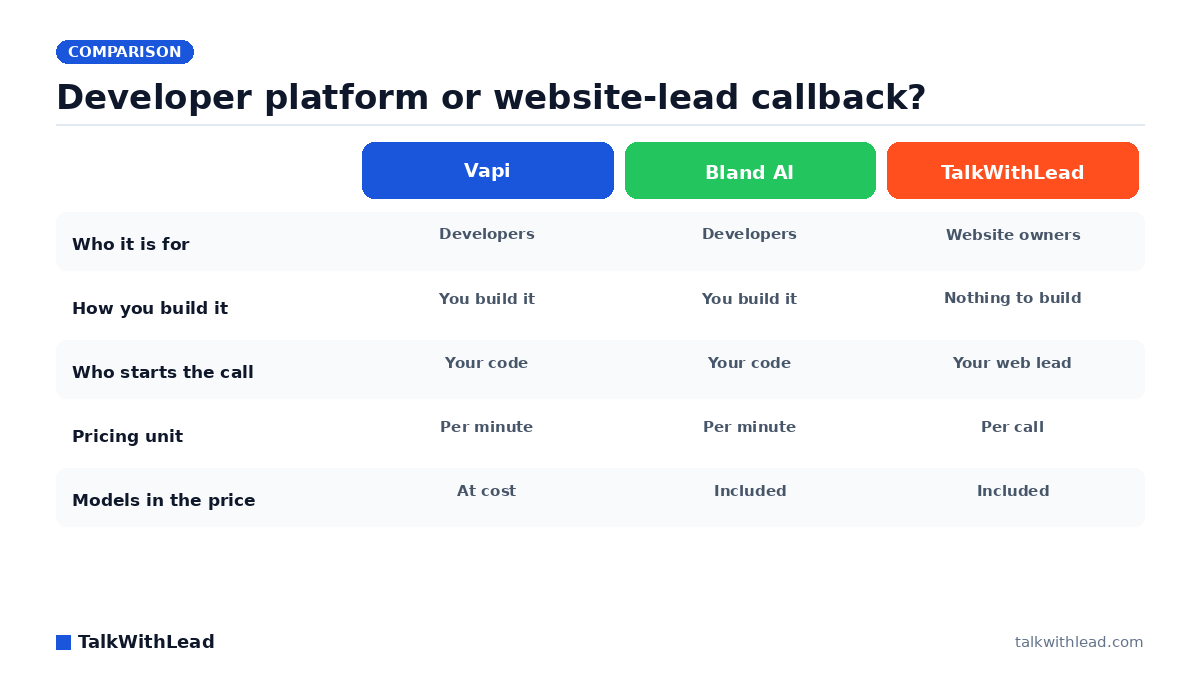
    Developer platform or website-lead callback? — TalkWithLead original infographic (comparison diagram).
    Developer platform or website-lead callback?

    Vapi alternative: the short answer, by job

    Vapi prices usage as a stack of parts: hosting per minute, model costs passed through, extra concurrency per line, add-ons per month, and an optional success package on top. Most of this page is written for developers and technical founders who want programmable voice infrastructure with a simpler bill; the short block after the direct answer is for readers who only need their own website leads called back.

    Direct answer: the real Vapi replacements are Retell AI, Bland AI, Synthflow and ElevenLabs Agents: platforms where you build and run your own voice agents. TalkWithLead belongs on the list for one narrow job only, calling back the leads that arrive through your own website. It is not a developer platform: no agents built through an API, no inbound number, no calling campaigns.

    If your job is calling back your own website leads

    Not everyone comparing Vapi alternatives wants to build a voice agent. If what you need is website leads called back within seconds of entering their number, during the working hours you set and within your plan’s call allowance, TalkWithLead does that job with nothing to build:

    • The trigger: a visitor enters a phone number anywhere on your site, in the widget, a contact or quote form or an abandoned-cart flow, or your CRM sends the number through the API.
    • The call: TalkWithLead rings the lead in seconds, and an AI voice agent talks with them, answers their questions and qualifies the enquiry.
    • The booking: the AI voice agent can book the appointment into your business’s calendar.
    • The human option: in human-bridge mode the system calls the visitor and your own staff and puts the two of you on one call instead.
    • The boundary: it never answers calls placed to your own business number. Every call starts from your website or the API.

    A fit if:

    • your leads arrive through your own website forms, the widget or your CRM, and you want them called back automatically without building or hosting anything;
    • you want the AI voice agent to qualify the lead and book it into your calendar, or you want your own staff on the call through human-bridge mode;
    • you would rather choose a plan by the number of calls than model per-minute costs.

    Not a fit if:

    • you want to design, host and run your own voice agents through an API (use the platforms in the table below);
    • you need a phone number that answers inbound calls, or outbound calling campaigns to a list;
    • you measure spend in agent minutes rather than calls.

    To check the fit before signing up, hear the live demo yourself: click the widget and talk to the agent. If it fits, start on the free Basic plan: $0 with no credit card, 10 calls, 1 widget and a 14-day free trial.

    Every price on this page was re-read from the vendor’s own pricing page on 29 September 2026 and is linked so you can check it. No benchmarks, latency figures or quality rankings appear here, because none have been run.

    Why people leave Vapi

    Nothing below is a complaint about Vapi’s engineering. It is a list of the billing shapes that show up on the published pricing pages, because billing shape is usually the reason a team starts shopping.

    • Assembling component prices. On Vapi you pay $0.05 per minute for hosting, then speech-to-text, the LLM, text-to-speech and transport are each billed at the provider’s price with no markup. Your true per-minute figure depends on which models you pick, so you compute it yourself.
    • Per-line concurrency charges. Usage without a success package includes 4 concurrent calls, and the paid success packages include more; each extra line is $10 per line per month. A team planning for a launch spike budgets for lines it may use for a week.
    • Add-on and package pricing. The HIPAA add-on is $2,000 per month, and Zero Data Retention now comes only with a paid success package, which changes the economics for a small product that needs either one.
    • Enterprise-only vendors. Some alternatives publish only an enterprise contract. Synthflow’s pricing page lists engagements starting at $30,000 annually and documents no self-serve tier, which rules it out for a two-person team testing an idea.
    • Wanting the models inside the per-minute number. Bland AI publishes a per-minute talk-time rate with the LLM, speech-to-text and text-to-speech included and no token charges; transfer time has its own rate and telephony is billed separately. For teams tired of spreadsheets, that predictability is the whole pitch.

    Two more details matter to production teams. Without a success package, raw call data is kept for 14 days and support is the Discord community plus email with no response SLA. Longer retention and support SLAs come with the paid success packages listed in the Vapi pricing detail below.

    Vapi alternatives compared: who each option is for

    The table lists the six options side by side. Cells hold only what each vendor publishes; “not documented” means the pricing page does not say.

    OptionWho it is forHow you build or configure itWho starts the callPricing model (observed 29 September 2026)What you must supply
    VapiDevelopers building their own voice agentsYou build the agent; hosting is per minute, models pass through at costYour build decides$0.05 per minute hosting plus models at cost; 4 concurrent calls without a package; Core $29 per month (10 lines), Pro 10% of hosting with a $999 monthly minimum (30 lines), Premier through sales; $10 per extra line per monthYour agent logic; your choice of model providers
    Retell AIDevelopers and technical foundersYou build the agent; pay-as-you-go from $0 with $10 in free creditsYour build decidesVoice agents $0.07 to $0.31 per minute; chat from $0.002 per message; 20 concurrent calls included; enterprise customYour agent logic; voice and LLM choices set the rate
    Bland AIDevelopers who want the models included in the per-minute rateYou build the agent; two self-serve tiers plus enterpriseYour build decidesStart $0.14 per minute, no platform fee; Build $0.12 per minute plus $299 per month; enterprise customTelephony (billed separately); your agent logic
    SynthflowEnterprisesScoped engagement covering telephony setup, integrations and launch supportScoped in the contractEnterprise contracts from $30,000 annually; no self-serve tier documented on the pricing pageNot documented on the pricing page
    ElevenLabs AgentsBuilders who want monthly minute bundlesYou build the agent; six monthly plansYour build decidesFree $0 (15 minutes, 4 concurrent) up to Business $990 per month (12,375 minutes, 40 concurrent); extra minutes $0.08; burst $0.16 per minuteLLM, billed separately; any external telephony provider bills you directly
    TalkWithLeadBusinesses that want leads from their own website called backNothing to build: add the widget, link forms or your CRM through the API, set working hoursTalkWithLead rings the lead after a number is entered on your site or arrives through the APIBy call volume, quoted in USD: Basic $0 (10 calls, 1 widget, 14-day trial); Standard $99.99 (100 calls) up to Enterprise $599.99 (800 calls)Your website and the numbers visitors enter; minutes and the AI voice agent are included

    How much does Vapi cost per minute, and what do the alternatives charge?

    Every figure below carries the date it was observed. Prices change; the link beside each vendor’s name goes to the page the numbers came from.

    Vapi (pricing page, observed 29 September 2026)

    • Usage with no success package: $0 to start with $5 in free credits; hosting $0.05 per minute.
    • Model provider costs (speech-to-text, LLM, text-to-speech) and transport are billed at the provider’s price with no markup; Vapi’s own telephony and SIP transport are listed as free.
    • Without a package: 4 concurrent calls, 1 Vapi phone number, 14 days of raw data retention, Discord community support and email support without an SLA.
    • Success packages: Core $29 per month (10 concurrent calls, 30 days retention, Zero Data Retention included); Pro 10% of the Vapi hosting fee with a $999 monthly minimum (30 concurrent calls, 180 days retention); Premier custom, direct sales only.
    • Add-ons on any package: HIPAA $2,000 per month; extra concurrent lines $10 per line per month; extra organizations $20 per month.

    Retell AI (pricing page, observed 29 September 2026)

    • Pay-as-you-go starts at $0 with $10 in free credits and no commitment.
    • Voice agents are $0.07 to $0.31 per minute; chat agents start at $0.002 per message.
    • 20 concurrent calls are included.
    • Published components: Retell voice infrastructure $0.055 per minute; platform text-to-speech voices $0.015 per minute or ElevenLabs voices $0.040 per minute; the LLM priced per model, for example $0.045 per minute for GPT 4.1 and $0.16 per minute for GPT 5.5 on the standard tier.
    • Telephony bought through Retell is priced by country; custom telephony and SIP trunking carry no Retell charge.
    • Enterprise pricing is custom.

    Bland AI (pricing page, observed 29 September 2026)

    • Start: $0.14 per minute, no platform fee, no card required, 10 concurrent calls, 100 calls a day.
    • Build: $0.12 per minute plus a $299 per month platform fee, 50 concurrent calls, 2,000 calls a day.
    • The LLM, speech-to-text and text-to-speech are included in the per-minute talk-time rate with no token charges; telephony is billed separately, through your own carrier or Bland’s at pass-through cost.
    • Transfer time has its own rate: $0.05 per minute on Start and $0.04 per minute on Build. The pricing page says customers who bring their own telephony pay no transfer fees.
    • Enterprise is a custom contract.

    Synthflow (pricing page, observed 29 September 2026)

    • The pricing page lists one option: enterprise contracts starting at $30,000 annually, scoped around call volume, concurrency, telephony setup, integrations, security needs and launch support.
    • A self-serve tier is not documented on the pricing page.

    ElevenLabs Agents, now sold as ElevenAgents (pricing page, observed 29 September 2026)

    • Free $0 per month, 15 call minutes, 4 concurrent calls; Starter $6 per month, 75 minutes, 6 concurrent; Creator $22 per month, 275 minutes, 10 concurrent.
    • Pro $99 per month, 1,238 minutes, 20 concurrent; Scale $299 per month, 3,738 minutes, 30 concurrent; Business $990 per month, 12,375 minutes, 40 concurrent.
    • Additional call minutes $0.08 each; burst pricing $0.16 per minute above your concurrency limit; text messages $0.003 each.
    • The LLM is billed separately, by model. ElevenLabs adds no telephony fee; an external provider such as Twilio or a SIP trunk bills you directly for the carrier side.

    TalkWithLead (pricing page, observed 29 September 2026)

    • Basic: $0, no payment method required, 10 calls, 1 widget, 14-day free trial. The plans below are quoted in US dollars.
    • Standard $99.99 USD a month (100 calls, 3 widgets); Advanced $199.99 USD a month (200 calls, 4 widgets); Professional $299.99 USD a month (400 calls, 6 widgets); Enterprise $599.99 USD a month (800 calls, 15 widgets). Paid plans require a card and also include a 14-day trial.
    • Plans are priced by call volume, not by minutes; every plan includes unlimited minutes.

    Illustrative example, not a quote: assume a product that will use 2,000 call minutes in a month and set telephony aside because each vendor bills it differently. On Vapi without a success package the hosting component alone is 2,000 × $0.05 = $100, and speech-to-text, the LLM and text-to-speech are added at cost on top, so the final figure depends on the models you pick. On Bland AI Start the same minutes are 2,000 × $0.14 = $280 with the LLM, speech-to-text and text-to-speech included, before telephony and before any transfer time at $0.05 per minute. On Retell AI, the published range of $0.07 to $0.31 per minute puts the same minutes between 2,000 × $0.07 = $140 and 2,000 × $0.31 = $620, depending on the voice and model you choose; some models on Retell’s component table cost more than the top of that range, such as the GPT Realtime 2 speech-to-speech model at $0.38 per minute, so a stack built on one of them lands above $620. On ElevenLabs Agents, the Pro plan at $99 per month includes 1,238 minutes, and the other 762 minutes at $0.08 each add 762 × $0.08 = $60.96, about $160 in total; the Scale plan at $299 per month includes 3,738 minutes, so 2,000 minutes fit inside its bundle. On either plan the LLM is billed separately and any external telephony provider bills you directly. TalkWithLead does not price by the minute, so it does not fit this arithmetic; a plan there is chosen by the number of calls you expect.

    The different job TalkWithLead does: calling back your website leads

    TalkWithLead is in this comparison for one requirement, and precision about it matters. The trigger is a phone number entered anywhere on your own site: the widget, a contact or quote form, an abandoned-cart flow. A number can also reach TalkWithLead from your CRM or another tool through the API. TalkWithLead then rings that lead. In AI mode, the human-sounding AI voice agent speaks with them in more than 20 languages, qualifies the enquiry and books the next step. In human mode, the widget rings the visitor and your own staff together from the start of the call, so both people are on the call from its first second. The mode is chosen before the call, not during it.

    Three things it does not do, stated plainly. It never answers a call placed to your published business number. There is no inbound number and there are no calling campaigns. And there is nothing to build: no agent to design, no prompt to maintain, no model keys, no telephony account. You add the widget, set your working hours, and outside those hours the widget offers the visitor a callback for when the business is open again.

    What comes with every plan: unlimited minutes, both the AI voice agent and human mode, unlimited websites, free international calling between a published list of supported countries with pay-as-you-go elsewhere, automatic calls from web forms, your own number as caller ID, SMS and email notifications so you know the moment a lead comes in, call recording and transcripts, integrations and an API, and cancel anytime. Plans are priced by call volume, not by minutes, so the Basic plan’s 10 calls are a hard cap.

    Why a business wants this job done fast: according to Harvard Business Review research, companies that reach a web lead within an hour are nearly 7× more likely to qualify it than those that wait even an hour longer. A callback that starts while the visitor is still on the page is the mechanical way to stay on the right side of that gap. The trade-offs between a plain callback widget, click-to-call and a voice agent are covered in Click-to-Call vs Callback Widget vs AI Voice Agent.

    To hear it rather than read about it, open the live demo, click the widget and talk to the agent yourself.

    Screen recording of the live-demo panel on our own site, made by our team on September 16, 2026. A visitor enters a number and the AI voice agent places the call to them. The details typed here are fictional examples; nothing is submitted and no call is placed. This is our own product, not a customer’s call.

    Who this is not for

    An honest limitations list for TalkWithLead, so nobody buys it for the wrong job:

    • You cannot build agents through its API. The API accepts phone numbers and lead data from your tools; it is not a platform for designing, hosting or running your own voice agents.
    • There is no inbound number. TalkWithLead is not in the path of calls placed to your existing business number.
    • There are no calling campaigns. Every call begins with a visitor entering a number on your site or a number arriving through the API.
    • Pricing is per call, not per minute, and the free Basic plan stops at 10 calls. Teams that model cost per minute of agent time will find the unit does not map.
    • No benchmarks, latency figures or accuracy scores appear on this page for any product, TalkWithLead included, because none have been run for this comparison.
    • Anything not on a vendor’s pricing page is marked not documented here rather than guessed.

    Best for: a business whose leads arrive through its own website (forms, the widget, an abandoned-cart flow, or a CRM) and that wants those leads called back immediately without building or hosting anything.

    Not the right fit if: you need to build and run your own voice agents through an API, you need an inbound number or calling campaigns, or your volume is best measured in agent minutes rather than calls. Pick Retell AI, Bland AI or ElevenLabs Agents for self-serve building, or Synthflow for an enterprise engagement.

    How to choose a Vapi alternative

    Match the requirement to the option; do not start from the price list.

    • You want to build your own agents and pay only for usage: Retell AI (pay-as-you-go from $0 with $10 in free credits) or Bland AI Start ($0.14 per minute, no platform fee, no card required).
    • You want the models included in the per-minute rate: Bland AI, which states the LLM, speech-to-text and text-to-speech are in its talk-time rate with no token charges; transfer time has its own rate and telephony is billed separately.
    • You want a monthly bundle of minutes and a predictable invoice: ElevenLabs Agents, from the Free plan’s 15 minutes to Business at $990 per month with 12,375 minutes.
    • You want a scoped enterprise engagement with launch support: Synthflow, whose pricing page documents contracts starting at $30,000 annually.
    • You want to keep Vapi’s model flexibility: stay on Vapi, where model costs pass through with no markup, and budget $10 per month for each concurrent line beyond your package’s allowance (4 with no package; the Vapi pricing detail above lists each package’s allowance).
    • You want leads from your own website called back and have nothing to build: TalkWithLead. Start on the Basic plan, which is $0 with no credit card, 10 calls, 1 widget and a 14-day trial, and compare paid tiers on the pricing page. To size the value of a faster callback with your own assumptions first, use the free speed-to-lead ROI calculator.

    For a broader look at voice agents for small businesses that are not developer platforms, see Best AI Voice Agent for Small Business: General Buyer’s Guide.

    FAQ

    What is the best Vapi alternative?

    It depends on the job. For building and running your own voice agents on usage pricing, Retell AI and Bland AI publish self-serve per-minute rates; ElevenLabs Agents sells monthly minute bundles; Synthflow documents only enterprise contracts from $30,000 annually. For the single job of calling back leads that arrive through your own website, with nothing to build, TalkWithLead is the option on this list. No ranking is implied, because no benchmarks were run for this page. If Bland AI is already on your shortlist, a tier-by-tier breakdown of Bland AI pricing sets out its per-minute rates and limits in USD with the date they were read.

    Is there a Retell AI alternative that is not a developer platform?

    For agent building, every option in the table except TalkWithLead is a developer platform or an enterprise engagement. If the actual requirement is narrower, calling back people who entered a phone number on your website, TalkWithLead does that without an integration project or an agent to build. Its API exists to accept numbers from your CRM and other tools, not to construct agents.

    What is a good Synthflow alternative for a small business website?

    Synthflow’s pricing page documents enterprise contracts starting at $30,000 annually and no self-serve tier. A small business that only needs website leads called back can start on TalkWithLead Basic at $0 with no credit card, 10 calls and a 14-day trial. A small business that wants to build its own agent has self-serve entry points at Retell AI (starts at $0 with $10 in free credits), Bland AI Start (no platform fee, no card required) and the ElevenLabs Agents Free plan (15 minutes).

    How much does Vapi cost per minute?

    Observed 29 September 2026, Vapi’s hosting fee is $0.05 per minute, and speech-to-text, the LLM, text-to-speech and transport are added at the provider’s price, so the all-in rate depends on the models you pick. For a per-minute cost breakdown across voice agent platforms, see AI voice agent pricing.

    Do I need my own telephony account to use these platforms?

    Bland AI bills telephony separately, through your own carrier or Bland’s at pass-through cost. ElevenLabs Agents adds no telephony fee, but an external provider such as Twilio or a SIP trunk bills you directly. Retell AI sells telephony priced by country and charges nothing extra for custom telephony, and Vapi lists its own telephony and SIP transport as free while third-party carriers bill their own rates. Synthflow scopes telephony setup inside the enterprise contract. TalkWithLead includes unlimited minutes and free international calling between its supported countries, with pay-as-you-go elsewhere, so there is no separate telephony account.

    Can I get a Vapi alternative without writing code?

    For calling back website leads, yes: TalkWithLead has nothing to build. You add the widget or link your forms, set working hours, and calls are placed automatically when a visitor enters a number. For building your own agents, the platforms above are developer products. Their pricing pages, re-read on 29 September 2026, list these building tools: ElevenLabs Agents includes a Workflow Builder on every plan from Free up, Retell AI lists pre-built agent templates on pay-as-you-go, and Bland AI lists Conversational Pathways among its core features; Vapi’s pricing page lists no builder feature. None of those pages says how much can be set up without code, so check the product documentation or a free tier before assuming.

    What are the alternatives to Bland AI?

    For building your own voice agents, the self-serve options in this comparison are Retell AI (pay-as-you-go from $0 with $10 in free credits), Vapi ($0.05 per minute for hosting, with model costs passed through at cost) and ElevenLabs Agents (monthly minute bundles, starting with a Free plan of 15 minutes); Synthflow documents only enterprise contracts from $30,000 annually. The difference from Bland is mostly the shape of the bill: Bland folds the LLM, speech-to-text and text-to-speech into its per-minute talk-time rate, while Vapi and Retell price those components by the models and voices you choose. If the only job is calling back leads from your own website, TalkWithLead does it with nothing to build. For cost detail across vendors, see AI voice agent pricing.

    Vapi vs Retell AI: which one fits, and is there a no-code option?

    Both are developer platforms where you build the agent yourself. Vapi charges $0.05 per minute for hosting and passes speech-to-text, LLM and text-to-speech costs through at cost, with 4 concurrent calls before you add a paid success package for support SLAs, longer data retention and more lines. Retell AI publishes a range of $0.07 to $0.31 per minute for voice agents, set by the voice and LLM you choose, though some models on its component table cost more (GPT Realtime 2 is $0.38 per minute); 20 concurrent calls are included and enterprise pricing is custom. On building tools, Retell AI’s pricing page lists pre-built agent templates, while Vapi’s pricing page lists no builder feature; neither page says how much can be set up without code, so check the product documentation. If the no-code requirement is really website leads called back, TalkWithLead needs nothing built: add the widget or connect your forms, and website leads are called back within seconds of entering their number, during your working hours and within your plan’s call allowance.

  • AI Voice-First Lead Conversion for Law Firms

    AI Voice-First Lead Conversion for Law Firms

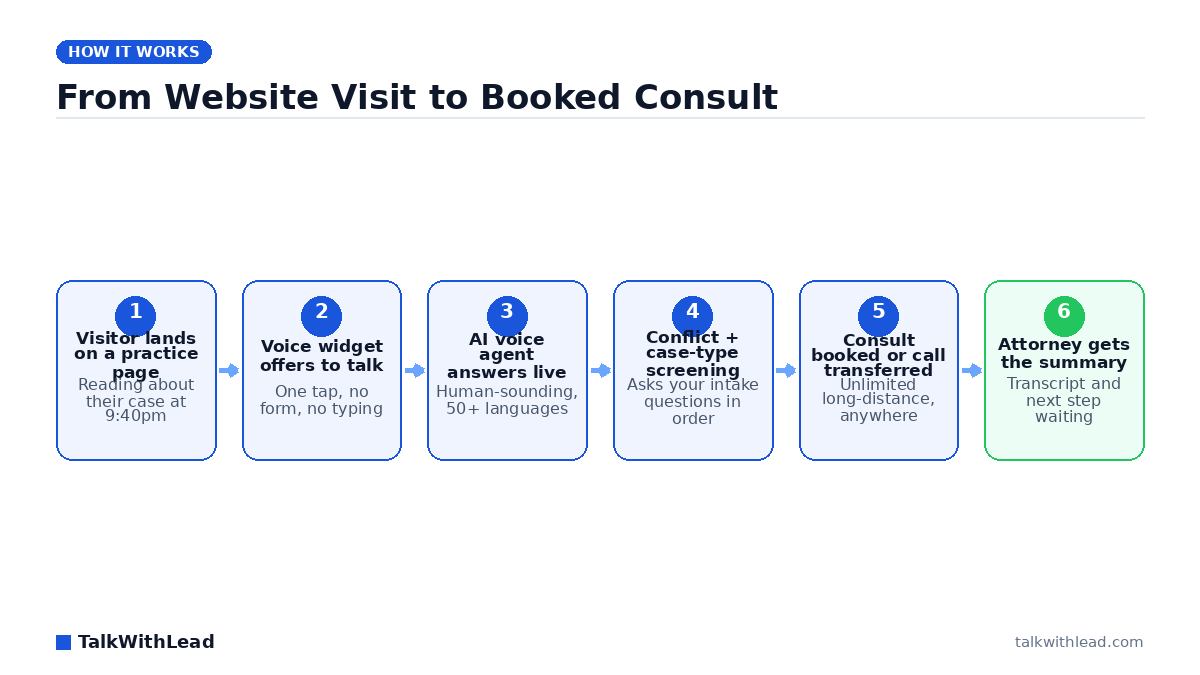
    From Website Visit to Booked Consult — TalkWithLead original infographic (flow diagram).
    From Website Visit to Booked Consult

    A person who just got rear-ended does not fill out a contact form and wait. They open three law firm websites, and they retain whichever one actually picks up. If your site answers with a text box and a promise to respond within one business day, you already lost that case.

    AI voice-first lead conversion for law firms means the website itself starts a real phone conversation instead of collecting a form. A human-sounding AI voice agent answers the visitor within seconds, screens the matter using your intake script, speaks more than 20 languages, and either books the consult or, in human mode, rings an attorney and the caller together from the start of the call over free long-distance calling between supported countries. The result is a live intake call rather than a lead sitting in an inbox overnight.

    Why legal intake breaks at exactly the wrong moment

    Most firms have decent traffic and terrible capture. The receptionist is at lunch, in a deposition prep, or gone at 5:01. Meanwhile the highest-value legal searches — accident, arrest, eviction, custody emergency — happen at night and on weekends, because that is when bad things happen to people.

    The gap is not marketing spend. It is answering. According to a 411 Locals study of 85 small businesses across 58 industries, only 37.8% of incoming calls were answered by a live person — meaning roughly 6 out of 10 calls went unattended. Apply that pattern to a personal injury practice and the leak is not a rounding error; it is the case list.

    Voicemail makes it worse. A prospective client who reaches a recording rarely leaves a message. They go back to the search results and click the next firm.

    How does AI voice-first lead conversion work for a law firm website?

    A voice widget sits on your practice-area pages. When a visitor taps it, an AI voice agent answers immediately and talks — no typing, no queue, no “an agent will be with you shortly.” It introduces the firm, asks what happened, and walks the caller through the same qualifying questions your intake coordinator would ask: date of incident, jurisdiction, injuries, insurance, opposing party, prior counsel.

    From there it does one of three things: book a consult on the calendar, ring whoever is on rotation and the caller together on one call, or trigger an instant callback if the caller wants a moment. Every conversation lands as a transcript and summary so an attorney reads the matter in thirty seconds instead of re-interviewing the client. You can hear the difference in tone on the live demo — the voice is the whole product, so it is worth listening to before deciding.

    The mechanics of what makes voice convert are broken down further in AI Voice Agents for Law Firms Websites and in Law Firm Intake Automation for Lawyers.

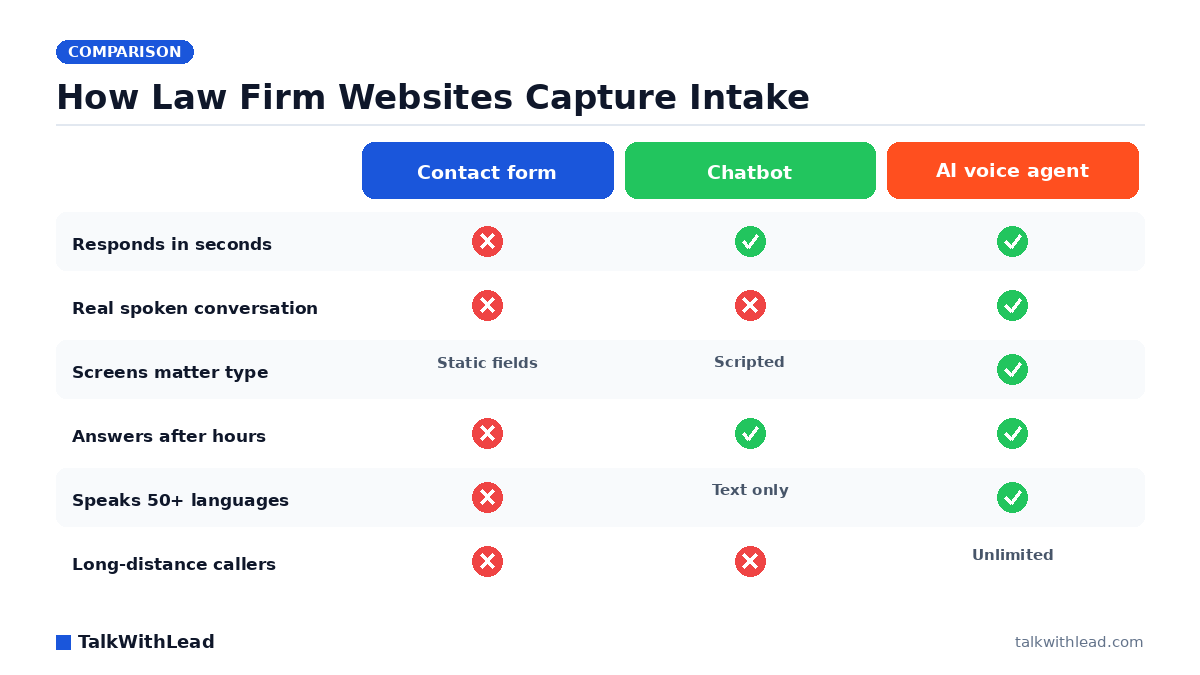
    Voice agent vs chatbot vs contact form vs answering service

    Firms usually have one of four things on the site. They are not equivalent.

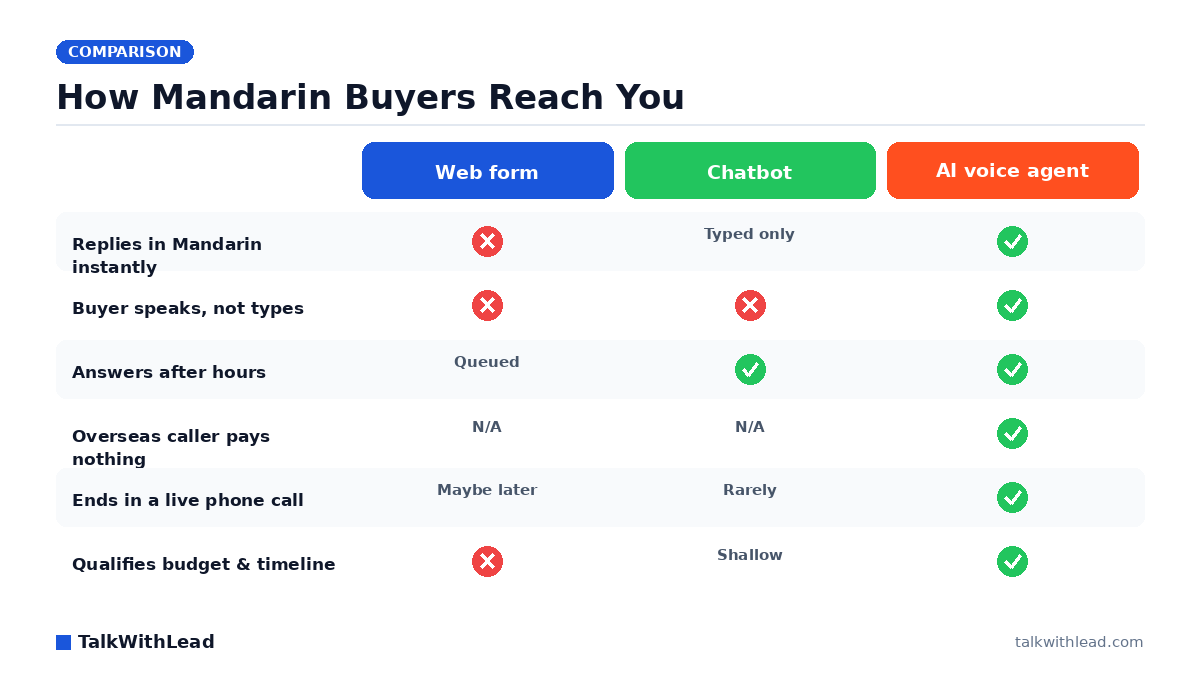
    CapabilityContact formWebsite chatbotHuman answering serviceAI voice agent
    Response timeHours to a dayInstant, in textRing queueSeconds, in voice
    Answers at 2amNoYesSometimesYes
    Actually a phone conversationNoNoYesYes
    Follows your intake script every timeNoPartlyVaries by repYes
    Languages coveredOneText onlyLimited20+ spoken
    Long-distance / out-of-state callerN/AN/AMeteredUnlimited
    Scales at 11pm FridayN/AYesCostlyYes

    Best for: firms that already get meaningful website traffic and know they are missing calls after hours, during hearings, or in a second language.

    Not the right fit if: your intake volume is tiny and a single paralegal answers every call within one ring — then the gain is marginal, and you should fix marketing before intake.

    What does the missed-case math actually look like?

    Here is an illustrative example, not a client result. Say a firm gets 600 website visitors a month and 90 of them tap to talk. Assume half arrive outside staffed hours, so 45 conversations currently die in voicemail or a form. Now assume a conservative signing rate of 12% on those conversations — that would be roughly 5 or 6 cases a month never opened. Put your own average case value against that number and the intake gap stops being an operations detail.

    Run your own version with the free missed-call revenue calculator, which uses your inputs rather than ours. On cost framing: an AI voice agent is priced as a flat monthly subscription rather than per-minute or per-lead, which is the opposite of how most answering services bill — see current tiers on the pricing page. Firms comparing the two models will also want AI Receptionist vs Human Answering Service Cost.

    Speed is the whole game in legal intake

    Response time is the single lever with the most evidence behind it. The MIT Lead Response Management study found you’re about 21× more likely to qualify a lead contacted within 5 minutes than one contacted at 30 minutes. Legal is a harsher version of that curve, because a claimant with a fresh injury is calling several firms in one sitting.

    A voice-first widget collapses that window to zero. There is no form submission, no CRM routing delay, no callback queue. The visitor is talking while they are still on the page reading about your practice area — which is the moment their intent is highest and their comparison shopping has not started yet.

    Multilingual intake is a case-volume decision, not a nicety

    A Spanish-speaking construction worker with a workplace injury is a serious matter, and most firms lose that call at hello. Same with Mandarin, Punjabi, Tagalog, Haitian Creole. Hiring bilingual intake staff for every language your market speaks is not realistic. An AI voice agent that handles more than 20 languages simply answers in whatever the caller speaks, screens the matter, and hands your attorney a summary in English.

    Free long-distance calling between supported countries matters for the same structural reason. Mass tort, class action, and multi-state practices get calls from everywhere, and metered per-minute answering costs quietly discourage the long screening conversations that surface the best cases.

    Rolling it out without disrupting the firm

    Start narrow and measure. A practical sequence:

    • After-hours only first. Let staff keep daytime calls; point evenings, weekends, and holidays at the voice agent. This is where the leaked value already sits.
    • Load your real intake script. Conflict-check questions, case-type disqualifiers, statute-of-limitations screening, jurisdiction. The agent should ask what your best intake coordinator asks.
    • Set clear escalation. Certain triggers — a caller in custody, an imminent filing deadline — should reach a human immediately rather than book a Tuesday consult.
    • Read the transcripts weekly. They are the cheapest client-research you will ever get, and they tell you which practice pages attract the wrong matters.
    • Then expand to daytime web enquiries. The second and third visitor to leave a number stops waiting.

    Nothing here requires replacing your case management system or retraining staff on new software. The widget goes on the site, the calls route where you say, and the intake team stops losing the ones that arrive at 10pm. You can put it on a practice-area page and watch the first week of transcripts by starting a free signup, or listen to the agent first on the live demo.

    FAQ

    What is AI voice-first lead conversion for law firms?

    It is an intake approach where the firm’s website starts a live phone conversation with a visitor instead of collecting a contact form. An AI voice agent calls back in seconds, screens the matter with the firm’s own intake questions, and books a consult or, in human mode, puts an attorney on the call from the start.

    Can an AI voice agent handle legal client intake properly?

    For first-touch screening, yes — it asks case type, date of incident, jurisdiction, injuries, and conflict-check questions consistently every time. It is a qualification and scheduling layer, not a substitute for legal advice; attorneys still evaluate the matter and give counsel.

    Will callers know they are talking to an AI?

    The voice is designed to sound natural rather than robotic, and the agent identifies itself as the firm’s virtual intake assistant. Most callers care far more that someone answered at all than about which side of the line is automated.

    How is this different from a website chatbot?

    A chatbot collects typed text and usually ends with “someone will reach out.” A voice agent produces the actual phone conversation the caller wanted. For a fuller side-by-side, see AI Voice Agent vs Chatbot: Which One Books More Calls?

    Does it work for Spanish-speaking or out-of-state callers?

    Yes. The agent handles more than 20 spoken languages and includes free long-distance calling between supported countries, so a Spanish-speaking claimant or an out-of-state inquiry gets a full screening conversation instead of a language barrier or a metered-minute cutoff.

    How much does an AI voice agent cost for a small firm?

    It is billed as a flat monthly subscription rather than per minute or per lead, which makes the cost predictable regardless of call volume. Current tiers are listed on the pricing page, and you can estimate the offsetting value with the missed-call revenue calculator.

  • AI Voice in Mandarin: Win Real Estate Leads You Lose

    AI Voice in Mandarin: Win Real Estate Leads You Lose

    How Mandarin Buyers Reach You — TalkWithLead original infographic (comparison diagram).
    How Mandarin Buyers Reach You

    A Mandarin-speaking buyer lands on your listing page at 9:40pm, reads the price in English, and has three questions she’d rather ask out loud in Mandarin: is the school catchment confirmed, is the seller flexible on closing, and can she see it Saturday. Your site offers her a form. She closes the tab and messages an agent from a WeChat group instead. That’s the exact leak ai voice in mandarin for real estate closes.

    TL;DR: An AI voice agent on your real estate website answers Mandarin-speaking visitors in Mandarin, out loud, the moment they ask — no form, no typing, no waiting for business hours. It qualifies budget, timeline, and neighbourhood, then books the showing, or in human mode rings your agent and the buyer together from the start of the call. With more than 20 languages and free long-distance calling between supported countries, an overseas or out-of-province buyer reaches you free.

    Why Mandarin-speaking buyers vanish from your funnel

    Mandarin buyers are not hard to reach. They are hard to hold. Many browse listings comfortably in English — MLS photos and square footage translate fine — but the decision conversation happens in Mandarin, often with a spouse, a parent, or an investor back home on the call. The instant your site forces that conversation into an English text box, you’ve asked the buyer to negotiate the biggest purchase of their life in their second language.

    The other half of the problem is distance. A parent in Shanghai buying a condo for a student in Toronto is not going to dial an international number to ask about parking. Picture a listing page that gets 200 Mandarin-speaking visitors a month and captures a dozen forms. Say even two of those silent visitors were pre-approved and ready — that’s two deals a month leaving through a gap you can’t see in your analytics, because non-conversions don’t fill anything in.

    What does an AI voice agent in Mandarin actually do?

    It picks up. A visitor taps the widget, speaks in Mandarin, and gets a human-sounding voice back in Mandarin within seconds — not a menu tree, not a canned translation, an actual conversation. The agent covers the questions your team answers forty times a week: price, taxes, condo fees, closing timeline, whether the unit is tenanted, when a showing is available.

    From there it does the part that matters to your business. It qualifies — budget range, financing status, purchase timeline, buyer vs. investor — and then either books the showing and drops the details to your agent or, in human mode, rings whoever is on duty and the buyer together from the start of the call. Because it runs on free long-distance calling between supported countries, the buyer in Shanghai and the investor in Vancouver both reach you at no cost to them. You can hear it work on the live demo before you decide anything.

    The same logic applies across every language your market speaks. We’ve written the parallel playbooks for Spanish-speaking buyers and Hindi-speaking buyers — same mechanism, different market.

    Mandarin AI voice vs. chatbot vs. translated form

    Most brokerages have already tried a fix. A translated contact form. A chatbot with a Mandarin toggle. Both fail for the same reason: they keep the buyer typing, and typing is slow, formal, and easy to abandon at 9:40pm.

    DimensionTranslated web formChatbot with Mandarin toggleAI voice agent (TalkWithLead)
    Response speedHours to next morningInstant, but textInstant, spoken
    Buyer’s effortType 6 fieldsType back and forthJust talk
    Handles follow-up questionsNoScripted, shallowOpen conversation
    After-hours coverageQueuedYesYes
    Overseas caller costN/AN/AFree (free long-distance calling between supported countries)
    Languages supportedWhatever you translatedUsually a handful20+
    Ends in a live phone callMaybe, days laterRarelyBridged call or booked showing

    Best for: brokerages and agents whose listing pages already draw Mandarin-speaking traffic — urban condo markets, school-catchment neighbourhoods, student-housing corridors, and pre-construction investor inventory.

    Not the right fit if: your Mandarin traffic is negligible, or your team genuinely cannot take a bridged call and has no one to route to. Voice creates conversations; you still need someone to close them. If you’re weighing the general case first, our AI voice agent vs. chatbot for real estate breakdown covers it.

    How fast do you actually have to respond?

    Faster than you think, and the research is consistent about it. The MIT Lead Response Management study found you’re about 21× more likely to qualify a lead contacted within 5 minutes than one contacted at 30 minutes. According to Harvard Business Review research, companies that reach a web lead within an hour are nearly 7× more likely to qualify it than those that wait even an hour longer.

    Now layer language on top. A Mandarin-speaking buyer who submits a form at 9:40pm isn’t just waiting until morning — she’s waiting until morning and hoping whoever calls back speaks Mandarin. Two failure points, both removed when the voice agent answers in Mandarin on the spot. Our deeper piece on speed to lead in real estate walks through the timing math.

    An illustrative ROI example (assumptions stated)

    This is math, not a case study — plug your own numbers in. Assume a listing site draws 300 Mandarin-speaking visitors a month and currently converts 4% into a form (12 leads). Assume the voice agent lifts spoken engagement to 9% (27 conversations) because the buyer can just talk. Now assume a 20% conversation-to-showing rate and a 17% showing-to-transaction rate: roughly 5 showings and just under one extra deal a month. At an assumed average commission of $12,000, that’s a materially different year — from one widget on one page.

    Run your own version against your missed-call volume with the free missed-call revenue calculator. Cost framing: an AI voice agent is a flat monthly software line, typically far below the cost of a bilingual receptionist covering evenings and weekends — see current pricing for exact tiers.

    How to roll it out without disrupting your team

    Start narrow and prove it. Pick the one listing or neighbourhood page that already draws the most Mandarin traffic and put the voice agent there first.

    • Week 1: Install the widget on a single high-traffic page. Set the greeting to detect and offer Mandarin.
    • Week 2: Write the qualification script your agents actually use — budget, financing, timeline, buyer vs. investor, preferred showing windows.
    • Week 3: Set routing rules. Who takes a bridged call during the day? Who gets the after-hours booking summary?
    • Week 4: Review recordings and transcripts. Fix the two or three questions the agent handled weakly.
    • Month 2: Roll it across all listing pages and turn on the additional languages your market speaks.

    The measurement that matters isn’t widget clicks. It’s booked showings from Mandarin-speaking callers, and how many of those existed before you installed anything. You can have the whole thing live on a page today — start free, or take the live demo first and hear how the Mandarin voice actually sounds before you commit a dollar.

    FAQ

    Does the AI voice agent really speak natural Mandarin, or is it translated English?

    It speaks conversationally in Mandarin — the visitor talks, the agent responds out loud in Mandarin with a human-sounding voice, and the exchange flows like a phone call rather than a translation layer. The same agent handles more than 20 languages, so a Cantonese or Korean speaker on the same page gets the same experience.

    Can a buyer in China call my listing without paying international rates?

    Yes. Free long-distance calling between supported countries is part of the platform, so an overseas parent, investor, or relocating buyer connects to you at no cost to them. That removes the single most common reason overseas prospects never dial a North American listing.

    What happens when nobody on my team speaks Mandarin?

    The AI voice agent handles the Mandarin conversation end to end — questions, qualification, showing preferences — and hands your agent an English summary plus a booked appointment. Your team never has to fake a language they don’t speak, and the buyer never has to switch out of hers.

    Is this better than adding a Mandarin option to my chatbot?

    For real estate, generally yes. A chatbot still makes the buyer type, in a second language, about a seven-figure decision, and it rarely ends in a phone call. Voice ends in a conversation with a person, which is where showings actually get booked.

    How much does an AI voice agent cost for a real estate website?

    It’s a flat monthly subscription rather than a per-call or per-minute answering-service bill, and the tiers are published on the pricing page. Compare it against what evening and weekend coverage from a bilingual receptionist would cost you, then weigh it against a single extra closed deal.

    Will it work on my existing website without a rebuild?

    Yes — it’s a widget you add to your existing site, whether that’s a WordPress blog, an IDX listing platform, or a custom brokerage site. Nothing about your listings, forms, or CRM has to change to test it on one page.

  • AI Voice Agents for Law Firms Websites: Win More Cases

    AI Voice Agents for Law Firms Websites: Win More Cases

    How Law Firm Websites Capture Intake — TalkWithLead original infographic (comparison diagram).
    How Law Firm Websites Capture Intake

    A person who just got rear-ended, fired, or served with papers does not want to fill out a form. They want to talk to someone right now — and if your website makes them type and wait, they will call the firm three results down the page. That is the exact gap AI voice agents for law firms websites close.

    TL;DR: An AI voice agent on a law firm website answers a visitor by voice within seconds, asks the intake questions a paralegal would ask, screens the matter type and jurisdiction, and either books the consultation or, in human mode, rings your attorney and the caller together from the start of the call. It runs after hours, speaks more than 20 languages, and places free long-distance calls between supported countries — so no qualified case is lost to a voicemail box.

    Why law firm websites leak cases

    Most legal sites are built to look credible, not to start conversations. The visitor gets a phone number that rings a front desk between 9 and 5, a contact form that promises a reply “within one business day,” and maybe a chat widget staffed by an offshore typist. Every one of those is a delay, and legal intent does not wait.

    Legal buyers shop in parallel. Picture a personal injury search where a visitor opens four firm websites in four tabs and calls whichever one answers first — that is the ordinary behavior of someone in distress, not an edge case. Research popularized by InsideSales / Dr. James Oldroyd found that roughly 35-50% of sales go to the company that responds first. In legal intake, “responds first” means picks up the phone.

    The other leak is the phone itself. According to a 411 Locals study of 85 small businesses across 58 industries, only 37.8% of incoming calls were answered by a live person — meaning roughly 6 out of 10 calls went unattended. A small firm with two attorneys in depositions all afternoon is exactly the business that study describes.

    What is an AI voice agent on a law firm website?

    It is a widget that sits on every page and, when a visitor taps it, starts a real spoken conversation with an extremely human-sounding AI voice. The visitor talks. The agent listens, answers, and asks the next question. No download, no phone tag, no typing on a cracked phone screen in a hospital parking lot.

    For a law firm, the agent is scripted around intake rather than sales chatter. A practical flow looks like this:

    • Greet and identify the matter — car accident, divorce, employment dispute, immigration, estate.
    • Screen the basics — where the incident happened, roughly when, whether another firm is already involved.
    • Flag urgency — statute deadlines, an arrest, a court date this week.
    • Book or connect — put a consultation on the calendar, or ring the on-call attorney and the caller together for a high-value matter.
    • Hand off clean notes — the attorney opens the consult already knowing the story.

    You can hear that flow rather than imagine it — the Live Demo lets you talk to the agent the same way a prospective client would.

    AI voice agent vs chatbot vs answering service for legal intake

    Firms usually compare three options. They are not equivalent.

    DimensionContact formChatbot / live chatHuman answering serviceAI voice agent
    Response timeHours to a daySeconds, by textRings out, then queueSeconds, by voice
    InteractionFieldsTypingPhone callPhone conversation
    After-hours coverCollects onlyUsually scriptedOften premium-pricedAlways on
    Legal-specific screeningStatic questionsShallowDepends on operatorTrained on your intake script
    LanguagesOneText translationLimited bilingual staff20+ spoken
    Out-of-state callersN/AN/AMetered minutesFree long-distance calling between supported countries
    Cost behaviorLow, low yieldPer seatPer minute / per callFlat subscription

    Best for: solo and small-to-midsize firms that get real website traffic, cannot staff a receptionist past 5pm, and lose consults to whoever answers first.

    Not the right fit if: your practice is referral-only with almost no web traffic, or your matters require privileged, attorney-only first contact from the very first sentence — in that case use voice purely to route and schedule, not to screen.

    If you want the head-to-head on cost specifically, we broke it down in AI Receptionist vs Human Answering Service Cost and Is an AI Receptionist Worth It for a Law Firm?.

    How much is a missed intake call actually worth?

    Legal is unforgiving math because one signed case can outweigh a year of software cost. Here is a labeled illustration, not a claim about any real firm.

    Illustrative ROI example. Assume a firm’s website produces 120 inbound intake attempts a month. Assume half arrive outside staffed hours or while your team is on another call — that is 60 unanswered attempts. Say even a small slice of those, imagine roughly one in twelve, was a viable matter, and the firm signs half of the viable ones: that is roughly 2 to 3 signed cases a month never reaching an attorney. At an assumed average case value of $3,000, that is $6,000 to $9,000 of monthly fee revenue leaving through an unanswered phone. Every number in that paragraph is an assumption you should replace with your own.

    Run your own version with the free missed-call revenue calculator — it takes your call volume and case value and shows the gap. The plain framing: an AI voice agent is a flat monthly subscription rather than a per-minute bill, so the cost does not spike in the month your marketing works. Current tiers are on the pricing page.

    Speed to lead is the whole game in legal intake

    Intake speed is not a nice-to-have metric. According to Harvard Business Review research, companies that reach a web lead within an hour are nearly 7× more likely to qualify it than those that wait even an hour longer. A firm that returns Friday-evening form submissions on Monday morning is not competing on that curve at all.

    An AI voice agent collapses the gap to zero because there is no gap — the visitor is already on the site, already motivated, and the conversation starts on the spot instead of being scheduled. The deeper mechanics of that timing advantage are in Speed to Lead: How Fast Should You Call a New Lead?

    Instant callback matters too. Some visitors will not tap a widget but will leave a number. The agent calls them back within seconds rather than adding them to a list someone works through tomorrow.

    Languages and long distance: the cases most firms quietly refuse

    Immigration, personal injury, employment, and family law all draw callers whose first language is not English. Today those calls often end with “can you call back when Maria is in?” — and the caller does not call back. A voice agent that speaks more than 20 languages takes that same call in Spanish, Mandarin, Punjabi, Portuguese, or Tagalog, screens it properly, and hands the attorney a summary in English.

    Free long-distance calling between supported countries covers the other version of the same loss: an out-of-state family member calling about a relative’s accident, or a prospective client who moved. The firm can talk to them without watching a per-minute meter. Our team wrote about the same pattern in other verticals in AI Voice Agent vs Chatbot for Local Businesses.

    How to roll it out without disrupting the firm

    Deployment is a website change, not a practice-management migration. A sane sequence:

    1. Write the intake script you already use. Whatever your paralegal asks in the first three minutes becomes the agent’s script.
    2. Define what the agent must never do. No fee quotes, no legal advice, no opinion on the merits — screen and schedule only.
    3. Set routing rules. High-urgency matter types ring an attorney immediately; everything else books a consult slot.
    4. Install the widget site-wide, with extra prominence on practice-area and “contact” pages where intent peaks.
    5. Review transcripts weekly for the first month and tighten questions that produced vague answers.

    Most firms are live the same week. You can start on the free signup, or talk to the agent first through the Live Demo and decide from there. If you want the intake-automation view rather than the widget view, see Law Firm Intake Automation for Lawyers.

    FAQ

    What is an AI voice agent for a law firm website?

    It is a widget on the firm’s site that starts a spoken conversation with a visitor in seconds. The AI voice screens the matter, captures contact details and case basics, and either books a consultation or alerts your attorney with the details right away — 24 hours a day.

    Can an AI voice agent replace my legal receptionist?

    It replaces the unanswered calls, not the person. Most firms keep their receptionist for daytime relationship work and let the agent cover evenings, weekends, lunch hours, and the web enquiries that arrive when nobody is free to call back — the windows where intake usually disappears.

    Is it ethical for an AI to handle legal intake?

    Screening and scheduling are administrative tasks that non-attorney staff already perform. The safeguard is scope: configure the agent to identify itself, collect facts, and book time with a lawyer, and explicitly bar it from giving legal advice, evaluating the merits, or quoting fees. Confirm the wording against your jurisdiction’s advertising and unauthorized-practice rules.

    How much does an AI voice agent cost for a small firm?

    TalkWithLead is a flat monthly subscription with free long-distance calling between supported countries rather than a per-minute answering-service bill, so the cost stays predictable as call volume grows. Current tiers are listed on the pricing page.

    Will it work for Spanish-speaking clients?

    Yes. The agent handles conversations in more than 20 languages, so a Spanish-speaking caller gets a full intake conversation instead of a callback promise, and the attorney receives the summary in English.

    How is this different from the chatbot already on my site?

    A chatbot asks a stressed person to type. A voice agent lets them talk, which surfaces detail a text box never captures — tone, urgency, the part of the story they would not have typed. Voice conversations also convert into booked consults because the prospect is already, functionally, on the phone with your firm.

  • AI Voice Agent vs Chatbot for SaaS Sales Teams

    AI Voice Agent vs Chatbot for SaaS Sales Teams

    Chatbot vs AI Voice Agent for SaaS Sales — TalkWithLead original infographic (comparison diagram).
    Chatbot vs AI Voice Agent for SaaS Sales

    Your SaaS pricing page gets the visit, the chatbot bubble pops up, and the buyer types “how much for 20 seats?” Twenty minutes later a rep replies to a form fill and the buyer is already demoing a competitor. That gap is the whole argument in ai voice agent vs chatbot for saas sales teams.

    Short answer: a chatbot is a text-capture tool, while an AI voice agent is a conversation tool. For SaaS sales teams, the voice agent wins on high-intent traffic because it answers the pricing, security, and integration questions out loud in seconds and books the demo inside the same session. Keep the chatbot for documentation and low-intent FAQ deflection.

    What is the real difference between an AI voice agent and a chatbot?

    A chatbot waits for typing. It matches intent to a scripted branch, hands over an email field, and hopes the buyer stays. Every extra message is another exit point, and buyers on a pricing page are comparing three tabs at once.

    An AI voice agent puts an extremely human-sounding voice in front of that same visitor. The visitor clicks once, the phone rings, and a real conversation starts — questions answered, objections heard, next step booked. TalkWithLead runs that agent in more than 20 languages with free long-distance calling between supported countries, so a buyer in Berlin or Bogota gets the same instant answer as one in Boston. If nobody on your team is free, the agent handles it and triggers an instant callback the moment a rep is.

    The distinction matters more in SaaS than almost anywhere else, because the qualifying questions are layered: seat count, current stack, integration needs, procurement timeline. Text drags that across days. Voice compresses it into four minutes.

    Which converts more SaaS demo requests?

    Speed is the variable that decides it. According to Harvard Business Review research, companies that reach a web lead within an hour are nearly 7× more likely to qualify it than those that wait even an hour longer. A chatbot does not reach anyone — it stores a message for a human to reach later. A voice agent reaches them while the pricing page is still open.

    Consider an illustrative example. Say your site gets 1,000 pricing-page visits a month and your chatbot captures 40 emails. Assume your reps eventually connect with half of those and close 10% of the connections — that is two new accounts. Now assume a voice agent converts even 6% of those same 1,000 visits into live conversations: 60 real calls, and at the same 10% close rate that is six accounts from identical traffic. The math is illustrative, but the mechanism is not: conversations close, transcripts do not.

    Want the reasoning in more depth? Our breakdown of AI voice agent vs chatbot conversion rate walks through the same comparison across page types, and SaaS demo request conversion for pricing pages covers placement specifically. You can also just watch it happen on the Live Demo — talk to the agent the way a prospect would.

    Side-by-side: chatbot, live chat, and AI voice agent

    DimensionWebsite chatbotLive chat repAI voice agent
    ChannelTyped textTyped textSpoken conversation
    Response timeInstant, but scriptedMinutes, if staffedInstant, conversational
    After-hours coverageYes, capture onlyNoYes, full conversation
    Qualification depthForm fieldsGood, rep-dependentBudget, seats, timeline, stack
    Demo bookingCalendar link handoffIn-sessionIn-session, on the call
    Language coveragePre-scripted stringsWhoever is on shiftmore than 20 languages
    International prospectsText onlyToll costs, time zonesFree long-distance calling between supported countries
    Best useDocs and FAQ deflectionExisting-customer supportHigh-intent buyer conversion

    Read the table as a routing map, not a scoreboard. Support traffic belongs in text. Buyer traffic belongs on the phone.

    How does an AI voice agent qualify a SaaS lead?

    SaaS qualification is a short list of hard questions, and buyers answer them more honestly out loud than in a form. A voice agent asks how many seats, which tools the team already runs, who signs off, and when the current contract renews. It logs the answers and routes the hot ones to a rep immediately.

    • Intent capture at the moment of interest — the agent engages while the buyer is still reading your pricing tiers, not the next morning.
    • Objection handling in real time — pricing pushback, SSO questions, migration worries get answered before the tab closes.
    • Instant callback — if the buyer prefers a later slot, the agent schedules it and calls them, so the follow-up never depends on a rep remembering.
    • Language match — the agent switches to the buyer’s language, which removes the quiet drop-off that kills international pipeline.

    Compare that to the chatbot path: message, email field, thank-you screen, nurture sequence, silence. Our post on live chat vs chatbot covers why even staffed text falls short at the buying moment. If you want to price the swap, see pricing before you build another nurture flow.

    What does slow response actually cost a SaaS team?

    Put a number on it with stated assumptions rather than a guess. Say your product runs $400 per month per account with an average 18-month lifetime — roughly $7,200 in lifetime value. Assume your site produces 30 high-intent pricing-page sessions a week and your current text-only setup converts 5% into sales conversations. That is 1.5 conversations a week. Lift that to 12% with a voice agent and you get about 3.6 a week, or roughly 8 extra conversations a month. Close a quarter of them and you have added two accounts, about $14,400 in lifetime value, from traffic you already paid for.

    Run your own version with the free speed-to-lead ROI calculator — put in your real traffic, deal size, and close rate. The assumptions above are illustrative, not a promise; the calculator makes them yours.

    Best for: SaaS teams with real pricing-page traffic, a deal size above roughly $100 per month, international prospects, and fewer reps than inbound demand.
    Not the right fit if: you sell a $9 self-serve tool where nobody expects a call, your traffic is overwhelmingly existing customers looking for docs, or your product is pre-launch with no pricing page yet. In those cases a chatbot and a good help center do more.

    Should you run both a chatbot and a voice agent?

    Usually yes, with clear routing. Keep the chatbot on documentation, changelog, and support pages where deflection is the goal. Put the voice agent on pricing, demo, comparison, and high-intent landing pages where a conversation is the goal. The two stop competing the moment you stop asking one tool to do both jobs.

    One caution from watching sites do this badly: do not stack a chatbot bubble and a voice widget in the same corner of the same page. Pick one primary action per page type. Our comparison of click-to-call vs callback widget vs AI voice agent covers which control fits which intent.

    Start where the money is. Put the voice agent on your pricing page first, measure demo bookings for two weeks, then expand. You can start free and have it live on the page today, or try the Live Demo first and hear exactly what your buyers would hear.

    FAQ

    Is an AI voice agent better than a chatbot for SaaS sales teams?

    For high-intent buyer traffic, yes. A voice agent answers pricing and integration questions out loud and books the demo in the same session, while a chatbot mostly captures an email for later follow-up. For documentation and support traffic, a chatbot is still the cheaper, better fit.

    Will an AI voice agent replace my SDRs?

    It replaces the waiting, not the reps. The agent picks up every visitor instantly, qualifies on seats, budget, and timeline, and hands warm, pre-qualified conversations to your team — so SDRs spend their day on buyers who already said yes to a conversation instead of chasing cold form fills.

    Can an AI voice agent handle international SaaS prospects?

    Yes. TalkWithLead’s agent speaks more than 20 languages and includes free long-distance calling between supported countries, so a prospect anywhere can have the conversation in their own language without your team covering extra time zones or paying per-minute international rates.

    Where should I put the voice widget on a SaaS site?

    Pricing page first, then the demo-request page and your competitor comparison pages. Those are the pages where a buyer already has a specific question and a specific objection. Leave documentation and support pages to your chatbot.

    How fast do I actually need to respond to a SaaS lead?

    Minutes, not hours. The MIT Lead Response Management study found you’re about 21× more likely to qualify a lead contacted within 5 minutes than one contacted at 30 minutes. A voice agent calls back in seconds, which is the only reliable way to hit that window around the clock.

    What does an AI voice agent cost compared with a chatbot?

    Chatbots are typically the cheaper line item; a voice agent is priced as a conversion tool rather than a deflection tool. The honest way to judge it is per booked demo, not per month — current plans and tiers are on the pricing page.

  • AI Voice Agent vs Live Chat for Contractors

    AI Voice Agent vs Live Chat for Contractors

    Live Chat vs AI Voice Agent for Contractors — TalkWithLead original infographic (comparison diagram).
    Live Chat vs AI Voice Agent for Contractors

    Your site gets the visit at 8:47pm. The furnace is dead, the homeowner has three tabs open, and whoever answers first gets the job. That is the real question behind ai voice agent vs live chat for contractors — not which widget looks nicer, but which one is actually awake when the money shows up.

    TL;DR: For contractors, an AI voice agent beats live chat because it calls back every visitor instantly, 24/7, and converts the visit into a real phone conversation instead of a typing session. Live chat only performs when a human is free to reply, which almost never describes a crew in the field. Keep live chat for quiet browsing questions; put voice in front of urgent, high-ticket work.

    Why live chat quietly underperforms for trades

    Live chat was built for teams that sit at desks. Contractors do not. The office manager is invoicing, the owner is on a ladder, and the phone is in a truck cup holder. When nobody picks up the chat within a minute, that window becomes a form — and a form is just a slower way of saying “we’ll call you back eventually.”

    The timing math is brutal, and it is well documented. According to Harvard Business Review research, companies that reach a web lead within an hour are nearly 7× more likely to qualify it than those that wait even an hour longer. A chat that goes unanswered until morning is not a slow lead. It is somebody else’s job.

    Then there is what typing does to a service inquiry. A homeowner describing a sewer smell, a soft spot in a subfloor, or a breaker that trips only when the dryer runs is not going to type it well. They will type six words, wait, and leave. Voice gets the whole story in twenty seconds.

    What an AI voice agent actually does on a contractor site

    TalkWithLead puts an extremely human-sounding AI voice agent on your website. A visitor clicks, and instead of a chat box, a conversation starts — out loud. The agent greets them, asks what is going on, captures the address and the trade, checks whether it is an emergency, and either books the slot or triggers an instant callback so a human closes it while the intent is still hot.

    Three things matter more for contractors than for almost any other vertical:

    • After-hours coverage. No-heat, no-water, and no-power calls arrive at night and on weekends. The voice agent never clocks out.
    • more than 20 languages. Service areas are not monolingual. A crew that can only intake in English is turning away paying neighborhoods, which is exactly the problem we break down in our bilingual Spanish AI answering service for contractors guide.
    • Free long-distance calling between supported countries. Out-of-state landlords, relocating buyers, and property managers calling about a unit three time zones away all reach you without a toll worry.

    Want to hear the difference before you decide anything? Take the live demo and talk to the agent the way a homeowner would.

    Which is better for contractors: AI voice agent or live chat?

    Better depends on what the visitor came to do. Someone comparing tankless water heaters at lunch is happy to type. Someone standing in two inches of water is not. Contractors skew heavily toward the second group, and the second group is where the ticket size lives.

    DimensionLive chat (human)ChatbotAI voice agent
    Response speedFast when staffed, dead when notInstant but scriptedInstant, every hour
    CoverageBusiness hours24/724/7
    Detail capturedGood, if the visitor typesWhatever the form fields allowFull spoken description
    Emergency triagePossibleWeakStrong — asks and escalates
    LanguagesLimited to staffText translationmore than 20 spoken languages
    Ends in a phone callRarelyAlmost neverBy design
    Staffing costPer seat, per shiftLowFlat subscription

    Best for: emergency and high-ticket trades — HVAC, plumbing, roofing, restoration, electrical — where the visitor wants to talk now and the first contractor to answer usually wins the job.

    Not the right fit if: your work is low-ticket, scheduled weeks out, and your buyers genuinely prefer async text — or if you already have a fully staffed intake desk answering chats in under a minute, every hour you advertise.

    The revenue you are already leaving on the table

    Run the arithmetic on your own numbers instead of trusting a vendor claim. Illustrative example, assumptions stated: say your site gets 600 visitors a month, and imagine only 4 of every 100 ever contact you — that is 24 inquiries. Now say half of those arrive outside office hours and go unanswered because live chat was offline. If your average job is worth $1,400 and you would have closed a third of the 12 you missed, that is roughly $5,600 a month walking to a competitor. Those are assumed rates, not measured results — plug in your real ticket and close rate with the missed-call revenue calculator and see what your own gap looks like.

    The pattern behind that math is not speculative. A 411 Locals study of 85 small businesses across 58 industries found that only 37.8% of incoming calls were answered by a live person — meaning roughly 6 out of 10 calls went unattended. Contractors are the archetype for that failure: the work itself makes answering impossible.

    Pricing on the voice side is a flat monthly subscription rather than a per-shift staffing line, which is what makes the comparison lopsided for small crews. See the pricing page for the current tiers, and our AI receptionist cost and ROI breakdown for contractors for the full accounting.

    How to run both without cannibalizing either

    You do not have to choose one and delete the other. The setup that works looks like this:

    1. Voice first on money pages. Emergency service, main service pages, and your city landing pages get the voice agent front and center.
    2. Chat on quiet pages. Blog posts, financing explainers, and “about us” can keep live chat or a simple text widget for low-urgency questions.
    3. Instant callback as the safety net. If a visitor will not talk right then, capture the number and fire a callback in minutes, not hours.
    4. Track which one books jobs. Tag the source on every booked call. Within a month you will know exactly which widget pays for itself.

    If you are still weighing widget types generally, the click-to-call vs callback widget vs AI voice agent comparison covers the mechanics of each. And if speed is the part you keep losing on, read how fast you should call a new lead before you change anything else.

    When you are ready to stop losing after-hours jobs, start free and put a voice on your site tonight — or try the live demo first and hear what your visitors would hear.

    FAQ

    Is an AI voice agent better than live chat for a contractor website?

    For most contractors, yes. Live chat depends on a human being free to type, which rarely happens when the crew is on site. An AI voice agent calls back instantly at any hour and turns the visitor into a phone conversation, which is how service work actually gets booked.

    Can an AI voice agent handle emergency service calls?

    It can triage them. The agent asks what is wrong, how urgent it is, and where the property is, then either books the appointment or escalates to an on-call technician with the details already captured. That beats a chat transcript nobody reads until morning.

    Will homeowners actually talk to an AI voice agent?

    Many do, because it is faster than typing and faster than waiting on hold. The voice is extremely human-sounding, and for anyone in an urgent situation, speaking is the path of least resistance. Visitors who prefer not to talk can still request an instant callback.

    Do I need to drop live chat if I add an AI voice agent?

    No. Run voice on emergency and service pages where urgency is high, and keep chat on informational pages where visitors are browsing. Tag your booked jobs by source and let the data decide where each one belongs.

    What about customers who do not speak English?

    The voice agent handles conversations in more than 20 languages, so your intake is not limited to whoever is staffing the phone that day. For crews serving mixed-language service areas, this is often the single biggest lift in captured leads.

    How much does an AI voice agent cost compared to staffing live chat?

    Live chat costs per seat and per shift, and covering nights and weekends means paying for coverage you may barely use. A voice agent is a flat monthly subscription with free long-distance calling between supported countries included. Current tiers are on the pricing page.

  • AI Voice-First Lead Conversion for Real Estate

    AI Voice-First Lead Conversion for Real Estate

    From Listing Page View to Booked Showing — TalkWithLead original infographic (flow diagram).
    From Listing Page View to Booked Showing

    Why real estate leads die between the listing page and the phone call

    A buyer finds your listing at 9:14pm, wants to know if the basement is finished and whether the seller will take an offer under asking, and there is nobody to ask. They fill in a form, or they don’t, and then they open the next tab. That gap between interest and conversation is where most agents quietly lose their pipeline.

    TL;DR: AI voice-first lead conversion for real estate replaces the contact form with an AI voice agent that answers the website visitor by phone within seconds, at any hour, in more than 20 languages. It asks the qualifying questions a good agent would ask — timeline, budget, financing, neighbourhood — then books the showing directly, or rings you and the buyer together from the start of the call when you run it in human mode. The lead becomes a conversation instead of an email you answer tomorrow.

    Speed is not a soft advantage in this business. According to Harvard Business Review research, companies that reach a web lead within an hour are nearly 7× more likely to qualify it than those that wait even an hour longer. Real estate compresses that further: the buyer who wants to see a house this weekend is calling three agents tonight, and the first real voice usually gets the showing.

    What does AI voice-first lead conversion for real estate actually do?

    It puts a voice option on every listing page, every neighbourhood guide, and every home-valuation page. The visitor taps once. An extremely human-sounding AI voice agent picks up immediately and holds a real conversation — not a scripted menu, not a text box that replies with links.

    In a single call the agent can:

    • Answer property-level questions the visitor is stuck on (square footage, taxes, HOA, showing availability).
    • Qualify the buyer: are they pre-approved, are they selling first, what’s their timeline, what’s their range.
    • Route the call — a hot buyer gets a call that rings you and them together, everyone else booked into a slot or handed a callback time.
    • Handle the whole thing in the visitor’s own language, across more than 20 of them.
    • Reach the caller anywhere, because long-distance calling is unlimited — relocation buyers and overseas investors are not a cost problem.

    You wake up to transcripts and booked showings instead of a form-fill queue. If you want to hear how it sounds before believing any of that, take the Live Demo — it’s the fastest way to judge whether the voice passes as human.

    Voice vs. form vs. chatbot: which converts a property inquiry?

    Every agent site already has a form. Many have added a chatbot. Both collect text and both hand the buyer a wait. Here is the honest comparison on the dimensions that decide whether a showing gets booked.

    CapabilityContact formWebsite chatbotAI voice agent
    Response to the visitorHours or next dayInstant textInstant live call
    Buyer effortType 5 fieldsType back and forthOne tap, then talk
    Qualifies budget & timelineRarelySometimes, if they stayYes, conversationally
    Handles a non-English buyerNoTranslated textmore than 20 spoken languages
    Books the showing on the spotNoLink handoffYes, or a live bridged call
    Works at 9pm and on weekendsCollects onlyCollects onlyFull conversation

    The pattern is consistent: text channels capture a name, voice channels capture a decision. That gap is bigger in real estate than almost anywhere else, because the purchase is emotional and the questions are specific to one property. We broke the mechanics down further in AI Voice Agent vs Chatbot: Which Is Better for Real Estate? and compared the widget formats in Click-to-Call vs Callback Widget vs AI Voice Agent.

    Best for: agents, teams, and brokerages whose listing pages get real traffic but whose leads arrive as unanswered form-fills, especially outside business hours.
    Not the right fit if: your site gets almost no organic or portal traffic yet — fix demand first, because a voice agent converts visitors you already have; it doesn’t create them.

    What is a missed after-hours inquiry actually worth?

    Run the math on your own numbers rather than trusting a vendor’s. Here is an illustrative example — the rates are assumptions, not measured results:

    • Say your listing pages get 900 visitors a month and 40 of them try to make contact.
    • Assume half of those attempts land outside your working hours, so 20 sit unanswered overnight.
    • Picture a quarter of those overnight inquiries being serious buyers — on that assumption, 5 real opportunities a month.
    • Assume you convert 1 of those 5 into a transaction and your side of the commission is $9,000.

    That single recovered deal dwarfs the cost of answering the phone automatically. Plug your own figures into the free missed-call revenue calculator and the speed-to-lead ROI calculator — no email required. Plan pricing is published openly on the pricing page, so you can compare the monthly cost against one commission and decide in about a minute.

    The unanswered-call problem is well documented outside real estate too. A 411 Locals study of 85 small businesses across 58 industries found only 37.8% of incoming calls were answered by a live person — meaning roughly 6 out of 10 calls went unattended. Real estate has no structural immunity to that.

    How do you roll it out on a real estate site without breaking anything?

    Start narrow and let the transcripts teach you. A practical sequence:

    1. Put voice on your highest-intent pages first — individual listings, home valuation, and “schedule a showing.” Those visitors already have a question.
    2. Write the qualifying script like your best buyer’s-agent call. Motivation, timeline, financing, area, must-haves. Five questions, not fifteen.
    3. Define the routing rule. Pre-approved and touring this week rings your cell from the start of the call. Everything else gets booked or scheduled for a callback.
    4. Turn on multilingual immediately if you serve any relocation, investor, or immigrant buyer segment. See AI Voice in Spanish for Real Estate for what that changes in practice.
    5. Read the transcripts weekly. The questions buyers keep asking are your next listing description edits and your next blog posts.

    Nothing here requires ripping out your CRM or your IDX. The widget sits on the site, the calls flow to your phone, and the summaries land in your inbox. You can have it live on your listing pages today with a free signup, then decide after a week of real transcripts whether the calls are worth keeping.

    The mistakes that make voice underperform

    Voice is not magic, and a few setup errors reliably waste it. Agents who get poor results almost always made one of these choices:

    • Hiding the voice option below the fold. If the buyer has to scroll past the photo gallery to find it, they won’t.
    • Over-qualifying. A twelve-question interrogation on a first call kills the very interest you captured. Get enough to route, then connect.
    • No path to a human. If a genuinely hot buyer can never reach a person, you’ve built a nicer form.
    • Ignoring the after-hours window. Evening and weekend traffic is exactly when portals send browsers to your site and exactly when competitors are also unavailable.
    • Treating multilingual as optional. A buyer who can ask questions in their first language stays on the call longer and stays with the agent who let them.

    For a wider view of how voice compares against the older widget options agents still run, AI Voice Agent vs Callback Widget vs Live Chat covers what each one actually converts.

    FAQ

    What is AI voice-first lead conversion for real estate?

    It’s a website setup where the primary conversion action is a live phone conversation instead of a form submission. A visitor on a listing page taps once, an AI voice agent answers immediately, qualifies them, and either books a showing or rings the agent and the buyer together from the start of the call.

    Will buyers realize they are talking to an AI?

    The voice is designed to sound human and conversational rather than robotic or menu-driven, and the agent identifies itself honestly when asked. Most callers care far more that someone picked up at 9pm and answered their question than about who was on the line.

    Can it handle buyers who don’t speak English?

    Yes — it converses in more than 20 languages, so a relocation or overseas buyer can ask about a property in their own language. Combined with free long-distance calling between supported countries, out-of-area buyers stop being a cost or a language problem.

    Does this replace my real estate agent or ISA?

    No. It replaces the dead time between a website inquiry and a human conversation. The AI calls back instantly and filters, then hands you buyers who are already qualified — so your calling hours go to people who are ready to tour.

    How fast should I respond to a new property inquiry?

    As close to immediately as you can manage. The MIT Lead Response Management study found you’re about 21× more likely to qualify a lead contacted within 5 minutes than one contacted at 30 minutes. An always-on voice agent makes that response time the default rather than a personal discipline problem.

    What does it cost to add voice to a real estate website?

    Plans are published on the pricing page, and the practical test is simple: compare a month of service against one side of one commission. You can start on a free signup and hear it on your own listings before committing.

Your next lead is on your site right now — ready to talk.

TalkWithLead’s AI voice agent rings that visitor back in seconds, qualifies the lead in their language, and books the call before the prospect can open a competitor’s tab. Forms are slow. Chatbots make people type. Voice closes.

Just curious about plans? See pricing →